What changes in QR artwork when an account changes plan
Free organization QR downloads carry the SendURL mark and allow styling on one link. Pro+ removes that mark and allows styling across links; an account change does not repaint artwork that has already been exported or printed.
A team upgrades an account after a packaging file has been approved and expects every printed code to lose the SendURL mark. Another team downgrades and worries that the picture on its existing card will somehow change. Separate three things: the account’s current download behavior, the saved route and the physical artwork already distributed.
Free is not an unbranded plain-code entitlement
Free organization codes carry a SendURL mark in the centre. Free also permits one saved link with a QR style. It is therefore inaccurate to describe Free as “plain codes only” or to say that all color and style controls require Pro.
The style allowance and the mark are different rules. A Free organization can use its one styled-QR link while the rendered code still carries the SendURL mark. Pro and higher remove that mark and allow styles on every link. Use the current plan comparison when making a production promise about those capabilities.
A new download is not the same object as an old file
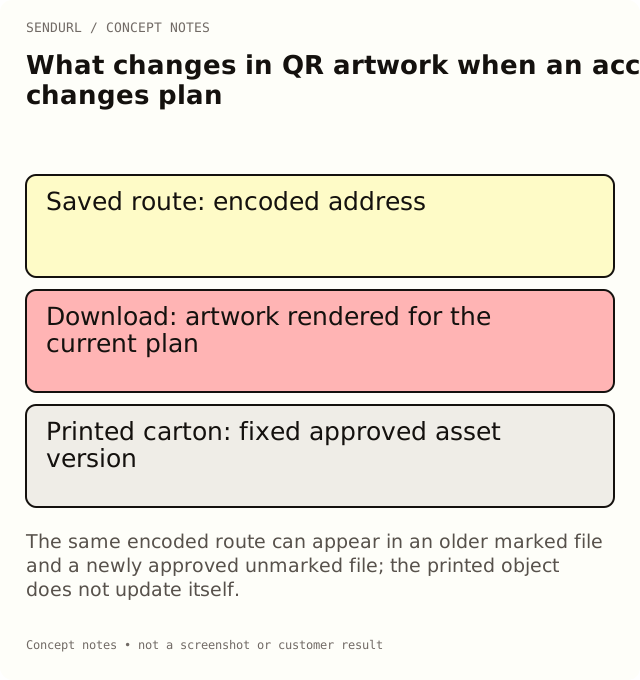
When the account renders and downloads a code, the current plan affects that rendering behavior. The file you saved earlier is a separate artifact. Its pixels or SVG instructions do not update themselves merely because the account’s plan later changes.
For an illustrative carton insert, the approved production PDF may contain the earlier marked artwork. After an upgrade, a newly exported code can differ in appearance. The carton already printed from the earlier PDF remains the same physical object. If the brand decision requires new artwork, approve a new file and proof rather than announcing that old packaging has changed.
Keep the encoded route separate from the appearance
The plan-based mark is a rendering rule; it does not change the encoded short URL. A customer scanning an approved code follows the address in that artwork. The saved destination and the short route are different from the visible mark or dot style.
That distinction is important for maintenance. Editing a destination is Pro+, and it can preserve the public short hostname and slug. Styling or removing a mark is an artwork decision. Neither one is evidence that a customer completed a purchase or that a physical print will scan under every condition.
Do not confuse styles with a branded-QR service
Self-serve QR styles include the supported color, dot and corner choices. There is no logo-upload control on any plan. Do not tell a reader that buying a plan reveals a logo-upload editor.
When a team needs specially prepared artwork, record who supplies and approves the actual file. Keep that file’s version and the physical proof record. A verbal request for “our logo in the QR” is not a completed production asset.
Test a changed artwork version as a new proof
A code can preserve its payload while its appearance changes. Decode the revised file and compare the payload with the approved route. Then test the physical proof at the intended size and on the intended material. A successful scan from a large display does not approve a smaller printed label.
Review quiet space around the symbol, contrast, finish and the readable fallback address. Keep the observation tied to the actual proof version. Do not use a plan feature or an error-correction setting as a blanket scan guarantee.
Record the account and asset contexts
A useful archive notes the plan context at export, the artwork version, the encoded route and the declared destination at approval time. It can also reference the maintenance owner and any later destination changes. These are separate records for separate jobs.
Do not assume the archive is a product-provided historical ledger. Keep the relevant observations in your own approved workflow. If an older file is still circulating, label it accurately rather than replacing its record with a new screenshot that suggests the old object was updated.
Choose the plan around the actual requirement
If the requirement is unmarked new account downloads or styling on every link, compare Pro+ features. If it is maintaining the destination after distribution, review destination editing. If it is additional account seats, those are arranged by hand on request. Every paid tier is self-serve through Paddle, but that does not make every associated service a self-serve dashboard control.
Create the owned link in SendURL before preparing production artwork. Where to Find a Link’s QR Code covers download steps, while QR Code Size for Print explains the physical proof considerations.
Frequently asked questions
Does upgrading remove the mark from a PDF I already exported?
No. A saved file and a physical print are separate artifacts. Export and approve a new version when the artwork must change.
Can Free style a saved link’s QR code?
Yes. Free permits one styled-QR link, and its organization codes still carry the SendURL mark.
Does the plan-based mark change the encoded URL?
No. It is a rendering rule. The route encoded in the artwork remains a separate property to verify.
Is custom logo artwork an automatic upload feature?
No. SendURL's QR styling covers colours, dot and corner shapes; there is no logo upload on any plan.
A QR code for every short link.
Every short link comes with its own QR code, and each scan is counted as a click and marked as a scan. Free, with no sign-up to start.