How to Track Link Clicks (With or Without Google Analytics)
Count clicks on any link you share, on your site or off it: which method sees what, what a click record contains, and how to pull the numbers out with code.
To track clicks on a link, you either measure on the page (an analytics event) or at the link itself (a redirect that logs each click). Which one you need depends on where the link lives: Google Analytics only sees clicks on pages that load its tag, so a link in an Instagram bio, an email, a PDF, a chat or on a printed poster needs a redirect link.
This guide covers both, shows what a click record contains, and ends with a checklist. It is the hub of the link tracking handbook; the other guides go deeper on who clicked your link, bot clicks and link previews, A/B tests and the best time to post.
Three ways to track clicks on a link
| Method | Works off your site? | Needs a script? | What you get | Cost |
|---|---|---|---|---|
| Analytics event (GA4 outbound click) | No, only on pages that run the tag | Yes, the Google tag | One click event per outbound link click, tied to the visitor's session | Free |
| Redirect link (short link) | Yes, anywhere the link can be posted | No | One record per click: time, country, device, browser, referrer | Free plans exist; paid plans add volume |
| Your email or SMS tool | Only in that tool's sends | No, the tool rewrites the links | Clicks per campaign and per recipient | Part of the tool |
Most people end up using two of these. GA4 for what happens on the site, and a redirect link for every place the site doesn't control.
Analytics events on your own site
GA4's enhanced measurement records a click event "each time a user clicks a link that leads away from the current domain", with the link's URL and domain as parameters, according to Google's enhanced measurement help page. It is on by default once enhanced measurement is switched on. Clicks between pages of your own site need a custom event, usually built in Google Tag Manager.
The limit is in the setup: GA4 counts only on pages where its tag loads and the visitor's consent and blockers let it run. A link you post anywhere else is invisible to it.
Redirect links (short links)
A short link such as snu.to/oct-news points at a server. When someone opens it, the server writes down the request, then sends the browser on to the real address with an HTTP 302 redirect.
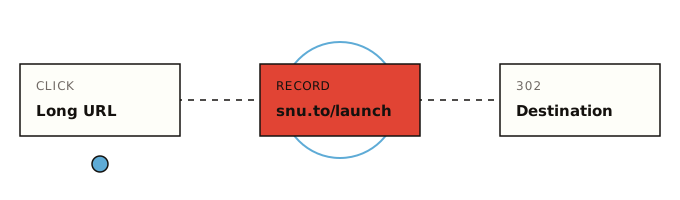
Because the count happens on the request to snu.to, it works wherever a link can go: a bio, an email, a QR code, a slide, a PDF, a Slack message. It also works when the destination isn't yours. A link to a Google Doc, a partner's page or a YouTube video counts its clicks the same way, and nothing has to be installed on the destination.
Your email or SMS tool's own tracking
Mailchimp, Klaviyo and many SMS platforms rewrite every link in a send into their own redirect (when click tracking is on). You get clicks per campaign and often per recipient, which a public short link can't give you. The numbers stay inside that tool, and they can include the bot clicks covered in why your click count is high.
Track link clicks without Google Analytics
You need a free link tracker and a couple of minutes. Still choosing one? Six free plans are compared in free URL shortener with analytics.
The steps:
- Shorten the URL. Paste it into the box on the SendURL home page. No account is needed for one link; it gets a random slug, a live click counter and a QR code, and it moves into your account with its history if you sign up later. With an account, the console lets you pick a custom slug such as
oct-news. - Make one link per placement. The newsletter, the Instagram bio and the conference slide each get their own link to the same destination. That is what tells you which one worked.
- Share the short link, not the long URL.
- Read the clicks. In the console, the link's page shows Total clicks, Last 7 days and Tracked since, a daily chart, and a Recent clicks list where each click opens its full record. The Analytics page charts clicks over 1 hour to 30 days, with up to 5 minutes of delay.
Free lists 7 days of analytics history and Pro 30; the link page and the API cover every click. The API returns the raw click rows, which is how you keep your own copy (see pull the numbers into a spreadsheet).
What a click record contains
This is one click as the API returns it from GET /links/:id/clicks:
{
  "id": "a4c6e8f0-1b3d-4e5f-9a7b-2c4d6e8f0a1b",
  "linkId": "5d8f2a1c-7b3e-4c9d-a0e1-6f2b8c4d1e7a",
  "ip": "203.0.113.24",
  "userAgent": "Mozilla/5.0 (iPhone; CPU iPhone OS 18_6 like Mac OS X) AppleWebKit/605.1.15 (KHTML, like Gecko) Version/18.6 Mobile/15E148 Safari/604.1",
  "referer": null,
  "country": "DE",
  "city": null,
  "device": "mobile",
  "deviceVendor": "Apple",
  "deviceModel": "iPhone",
  "browser": "Mobile Safari",
  "browserVersion": "18.6",
  "browserMajor": "18",
  "browserType": null,
  "engineName": "WebKit",
  "engineVersion": "605.1.15",
  "os": "iOS",
  "osVersion": "18.6",
  "cpuArchitecture": null,
  "source": "qr",
  "clickedAt": "2026-10-14T08:03:11.482Z"
}
What the fields mean in practice:
| Field | What it tells you | Watch out for |
|---|---|---|
clickedAt | When, in UTC | Convert to your audience's time zone before reading it |
country | Two-letter code from the visitor's IP (Cloudflare geolocation) | VPNs and corporate networks move it; T1 means Tor. No city: city is always null |
device, os, browser | Parsed from the user agent | In-app browsers often name the app: Instagram's is parsed as browser Instagram |
referer | The page the click came from, if the browser sent one | Often empty for clicks from apps, email and QR scans. Browsers default to sending only the origin (https://www.linkedin.com/), not the full page, under the strict-origin-when-cross-origin policy |
source | "qr" when the click came through the link's QR code | Every SendURL link's QR code encodes the short URL plus ?q, so scans and taps on the same link stay apart |
ip, userAgent | The raw request | Useful for spotting bots; treat them as personal data |
The full field list is in the click object reference, and what SendURL records for every click explains each one and what is not recorded, and using click country and device data shows what those two fields can and can't tell you.
One link per placement
The referrer can't be trusted to split your traffic, because so many clicks arrive without one. Separate links can. The same destination, https://example.com/autumn-sale, shared in six places:
| Placement | Slug | What you learn |
|---|---|---|
| October newsletter, main button | oct-news-cta | Clicks from the newsletter, separate from social |
| Instagram bio, link 2 | autumn-ig-bio | Clicks on that one bio slot, with time and device |
| LinkedIn post | autumn-li-post | Whether the post moved anyone, beyond reactions |
| Slack community share | autumn-slack | Clicks from a channel with no impressions data at all |
| Window poster (QR) | autumn-poster | Scans of the printed code, flagged source: "qr" |
| Sales deck PDF | autumn-deck | Whether anyone opened the link in the deck |
Slugs on snu.to are shared by every SendURL user, so a short generic slug may be taken already; add the campaign or a date. They also can't be renamed once created. How to name a custom short link has the naming rules, and the social media link tracking guide has a full placement sheet for a campaign.
The same idea works away from marketing. A link to an internal runbook or a status page tells you whether people open it; a link in a partner's newsletter tells you what their audience did, without asking them for a report.
Why your numbers won't match
Put a short link, your email tool and GA4 on the same campaign and you'll get three different numbers. Expect it:
- The short link counts more than people. Chat apps fetch a link to build its preview, and email security scanners open links before delivery. SendURL counts each of those, because it doesn't filter bots, and it counts total clicks, not unique visitors. Bot clicks and link previews shows how to spot and subtract them.
- GA4 counts fewer. Consent banners, ad blockers and people who close the tab before the page loads all stop GA4 from recording a visit that the redirect already counted.
- GA4 also counts things the link never saw. Direct visits, other sources and repeat sessions land in the same reports.
Link analytics vs web analytics goes through the reconciliation line by line. To work out a rate from these counts, see how to measure click-through rate, or enter clicks and impressions in the CTR calculator.
Pull the numbers into a spreadsheet
Every link and every click in the console is also in the REST API, on every plan: the raw click rows and daily counts, from which you can rebuild any chart. Create an API key in the console, then keep it in an environment variable:
export SENDURL_API_KEY="snu_..."Create a tracked link (with no slug, SendURL picks a random one, so this runs as written):
curl -X POST https://api.sendurl.to/api/v1/links \
  -H "Authorization: Bearer $SENDURL_API_KEY" \
  -H "Content-Type: application/json" \
  -d '{"destinationUrl": "https://example.com/autumn-sale", "title": "Autumn sale: newsletter"}'
The response is the new link, with its id, shortUrl and qrUrl. A link's id is also in its console address, console.sendurl.to/links/<id>. Read its latest clicks:
curl "https://api.sendurl.to/api/v1/links/$LINK_ID/clicks?limit=10" \
  -H "Authorization: Bearer $SENDURL_API_KEY"
Each response holds up to 10 clicks and a pagination.nextCursor for the next page (pagination reference). This Python script walks every page and counts one link's clicks by country (install requests first with pip install requests):
import os, time
from collections import Counter

import requests

API = "https://api.sendurl.to/api/v1"
HEADERS = {"Authorization": f"Bearer {os.environ['SENDURL_API_KEY']}"}

def clicks(link_id):
    """Every click of one link, newest first, 10 per request."""
    params = {"limit": 10}
    while True:
        r = requests.get(f"{API}/links/{link_id}/clicks", headers=HEADERS, params=params, timeout=10)
        r.raise_for_status()
        page = r.json()
        yield from page["clicks"]
        if not page["pagination"]["hasMore"]:
            return
        params["cursor"] = page["pagination"]["nextCursor"]
        time.sleep(0.25)  # stay under the API's rate limit

by_country = Counter(c["country"] or "unknown" for c in clicks(os.environ["LINK_ID"]))
for country, n in by_country.most_common():
    print(f"{country}\t{n}")
Run it with LINK_ID=<id> python3 clicks_by_country.py and paste the output into a sheet. The URL shortener API guide for Python and JavaScript takes this further: bulk link creation, a full CSV export and error handling.
Checklist: before you share a tracked link
- One short link per placement, all pointing at the same destination
- Slugs that say what they are (
oct-news-cta, notlink3), checked for typos before anything is printed - UTM parameters, if you use GA4, added to the destination URL before shortening (the short link passes the destination on as stored; UTM parameters guide)
- The short link opened once on a phone, so you know it lands where you expect (that test counts as a click)
- A note of when each link went live, so clicks can be read against posting times
- A plan for the counts: compare placements after a fixed period, and discount previews and scanners
- For printed QR codes: the link's QR downloaded as SVG, and a scan test at final size (track QR code scans)
Shorten your first link on the home page; the count starts with the first click.
Frequently asked questions
Can I track clicks on a link I don't own?
Not on the original link: only its owner sees those clicks. You can wrap any URL you share (a YouTube video, a product page, a Google Doc) in your own short link, and then you count the clicks that come through your link. Clicks on other copies of the URL stay invisible to you.
Can you track link clicks for free?
Yes. GA4 is free for clicks on your own pages, and many URL shorteners have a free plan. SendURL's Free plan holds 100 links and records every click with its time, country, device, browser and referrer. The plan lists 7 days of analytics history; the link page and the API cover every click.
How do I know if someone clicked my link?
Send a tracked link instead of the plain URL. A redirect link logs each request before it forwards the visitor, so the click shows up with its time, country and device. It can't tell you who the person was.
Does Google Analytics track clicks on links in emails?
No. GA4 only runs on pages that load its tag, and an email is not one of them. It sees the visit when someone lands on your tagged site, and UTM parameters on the link tell it the visit came from email. A click on an email link that goes to someone else's site never reaches GA4.
Start tracking links free.
Create your first short link with click analytics in seconds. No credit card, no sign-up to start.
Shorten a link