QR Code Size for Print: Minimum Size, Quiet Zone, Checklist
Part of the QR & print handbook
As a rule of thumb, print a QR code at least 2 cm wide, and about a tenth of the distance people will scan it from. The worked maths from URL length to module size, the quiet zone, and a checklist for the printer.
Print a QR code at least 2 cm (0.8 in) wide, and about a tenth of the distance people will scan it from: a poster read from 2 m needs a code around 20 cm wide. Both numbers are rules of thumb from QR vendors, not a standard. What really decides whether a code scans is the size of each little square (a module), and that depends on how long the URL inside the code is.
This guide gives the size table, shows the calculation from URL length to module size, and ends with a checklist to send the printer. It's part of the QR and print handbook, which starts with how to track QR code scans.
The short answer: sizes by use
The suggested width includes the white border. It follows two rules of thumb together: never under 2 cm, and about one tenth of the scanning distance (Bitly's guide puts the ratio at "about 10:1", October 2024; it isn't in the ISO standard or in Denso Wave's material).
| Use | Typical scan distance | Suggested minimum width |
|---|---|---|
| Business card, sticker, ticket | 15–20 cm, in the hand | 2 cm (0.8 in) |
| Product packaging, bag insert | 20–30 cm | 2.5–3 cm (1–1.2 in) |
| Menu, table card, flyer | 30–50 cm | 3–5 cm (1.2–2 in) |
| A3 or A2 poster on a wall | about 1 m | 10 cm (4 in) |
| Shop window, poster across a room | about 2 m | 20 cm (8 in) |
| Slide on a projector or screen | 5 m from the back row | 50 cm on the screen |
| Banner at an event | 5–10 m | 50 cm–1 m |
The distances are assumptions: measure your own. If you're unsure, go one size up. A code that is too large has one failure mode (someone standing right in front of it can't fit it in the camera frame), and a code that is too small fails for everyone further away.
Why URL length changes the size you need
A QR code is a grid of modules. Version 1 is 21×21 modules and each version adds 4 per side, up to version 40 at 177×177 (Denso Wave, the inventor). The version is picked by how much the code has to hold: more characters, more modules.
Squeeze more modules into the same printed width and each one gets smaller, so the phone needs to be closer. That is why a short URL helps: it keeps the code at a low version.
A SendURL code always encodes https://snu.to/<slug>?q. We generated codes the way the console does (error correction level M) for every slug length:
| What the code encodes | Characters | Version | Modules | With quiet zone |
|---|---|---|---|---|
https://snu.to/x7Kp2?q (random slug) | 22 | 2 | 25×25 | 33 |
https://snu.to/menu-window?q (slug of 10–25 characters) | 28 | 3 | 29×29 | 37 |
https://snu.to/spring-launch-2027-poster-a1-lob?q (26–32) | 49 | 4 | 33×33 | 41 |
| A long URL with UTM parameters, 115 characters | 115 | 7 | 45×45 | 53 |
Slugs of 1 to 9 characters give version 2, 10 to 25 characters version 3, and 26 to 32 characters version 4. The last row is what you get by printing the full tagged URL instead of a short link: https://example.com/autumn-sale?utm_source=poster&utm_medium=qr&utm_campaign=2026-10-autumn-sale&utm_content=window.
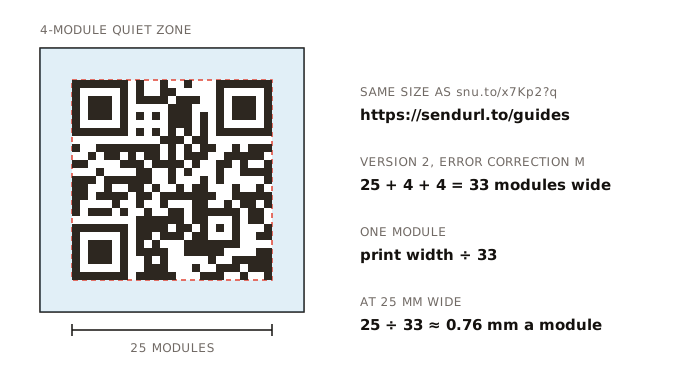
The arithmetic
Module size is the printed width divided by the number of modules across, quiet zone included:
def module_mm(width_mm, modules):
    """modules = the code's width in modules plus 8 for the quiet zone."""
    return width_mm / (modules + 8)

for label, modules in [("random slug", 25), ("custom slug, 10-25 chars", 29),
                       ("custom slug, 26-32 chars", 33), ("long UTM URL", 45)]:
print(f"{label:26} 2 cm: {module_mm(20, modules):.2f} mm 10 cm: {module_mm(100, modules):.2f} mm")random slug 2 cm: 0.61 mm 10 cm: 3.03 mm
custom slug, 10-25 chars 2 cm: 0.54 mm 10 cm: 2.70 mm
custom slug, 26-32 chars 2 cm: 0.49 mm 10 cm: 2.44 mm
long UTM URL 2 cm: 0.38 mm 10 cm: 1.89 mmAt 2 cm, the long UTM URL's modules are 38% smaller than a random slug's. To give them the same module size you'd print the long-URL code at about 3.2 cm instead of 2 cm. On a business card that is the difference between fitting and not.
To check any other URL, the qrcode npm package (the one SendURL's console uses) reports the size:
const QRCode = require("qrcode");

for (const url of ["https://snu.to/menu-window?q", "https://example.com/autumn-sale?utm_source=poster&utm_medium=qr"]) {
  const { version, modules } = QRCode.create(url, { errorCorrectionLevel: "M" });
  console.log(`${url.length} chars → version ${version}, ${modules.size}×${modules.size}, ${modules.size + 8} with quiet zone`);
}
How small can a module get? Denso Wave's FAQ says "with a common laser printer, the minimum printable module size is about 0.17 mm" (FAQ). That's the floor for printing, not a size people will scan comfortably from a poster. Use it as a sanity check for labels and tiny packaging, and go well above it everywhere else.
The quiet zone: 4 modules on every side
"QR Code requires a four-module wide margin at all sides of a symbol", in Denso Wave's words (how to print a code). The margin tells the scanner where the code ends. Text, a border or a busy photo inside it is the most common reason a well-sized code refuses to scan.
The PNG and SVG from SendURL already include the margin, which is why the 25-module code above measures 33 modules. Don't crop the white border to save space, and if the code sits on a coloured background, keep the white square around it.
Contrast and colour
Denso Wave's advice is plain: "please print out your QR Codes with black on a white background" (FAQ). SendURL's console codes are a near-black (#2d2720) on white.
- Dark on light. Light codes on dark backgrounds (inverted codes) fall outside that guidance. If a design needs one, test it on several phones before printing.
- Brand colours: a dark brand colour on white can work; pale colours, gradients and photos behind the code reduce contrast. Test before you commit.
- Finish: gloss and lamination reflect light into the camera. Matte scans better under shop lights and sun.
- Paper and ink: on uncoated paper, ink spreads and fills small modules. Another reason not to go to the minimum.
Error correction levels
Every QR code carries extra data so it still reads when part of it is dirty or covered. More correction means more modules for the same URL.
| Level | Recovers about | Notes |
|---|---|---|
| L | 7% | Smallest code; clean surfaces only |
| M | 15% | "Most frequently selected" (Denso Wave); SendURL's console codes |
| Q | 25% | Codes that get dirty or scuffed |
| H | 30% | Needed when a logo covers the middle |
Denso Wave's error correction page states M at 15% and Q at 25% in its text, and lists L and H in its table (error correction). It suggests Q or H for factory floors where codes get dirty.
The trade-off is visible on SendURL itself: the code for snu.to/x7Kp2?q is 25×25 at level M, and 29×29 at level H. The home page codes, which carry the small SendURL mark, use H; the console codes have no logo and use M, so they stay smaller at the same width.
Placement notes
Business cards and stickers. 2 cm is workable for a version 2 or 3 code. Print the short link as text under the code (snu.to/jo-card): some people would rather type it, and it shows where the code goes.
Menus and table cards. People scan sitting down, from 30 to 50 cm, often in low light. 3 to 4 cm, matte, not in a fold or near the spine of a booklet.
Packaging. Keep the code on a flat panel. On a bottle or a can, a large code wraps around the curve and distorts; a smaller code on the flattest part reads better. Leave the quiet zone clear of seams and barcodes.
Posters and shop windows. Size for where people stand, not where you'd like them to stand. Behind glass, test at night with the shop lights on; reflections are worse than in daylight.
Slides. A code on a slide has to be large on the screen and stay up long enough for the back row. Put it on its own slide for 20 seconds, add the short link in large text, and keep it in the PDF you share afterwards.
Outdoor. Sun fades ink and rain lifts stickers. Check outdoor codes now and then; a damaged code doesn't fail loudly, it just stops getting scans. A drop in a placement's daily scans in your scan tracking is often the first sign.
Printed codes are permanent
Once a code is printed, the URL inside it is fixed. With a short link, the destination behind it isn't:
- The slug can't change. It's part of the pattern. Choose it before you send the file; how to name a custom short link covers case, look-alike characters and naming patterns.
- The destination can change through the API, and every printed copy follows (change where a short link points). Use this when a page moves, not to reuse old flyers for a different campaign.
- An end date is optional. An offer that ends on 31 October can expire then, and late scans see a "Link expired" page instead of a stale offer (expiring links). Leave expiry off for packaging and anything that stays in circulation.
- Never delete a printed link. Deleting frees the slug, and someone else could claim it. Disable it instead.
- Mind the visit limit on long-lived codes: a Free plan link stops at 100,000 visits.
Every SendURL link comes with a free QR code with scan tracking, on its QR card in the console; where to find a link's QR code shows the card and both downloads. For a code that only needs to open a page, the free QR code generator can generate an SVG for print, with the 4-module quiet zone included; it counts nothing unless you make it trackable.
Pre-print checklist
Send this to whoever prepares the file.
- The code is the SVG from the link's QR card (vector, scales without blurring). The 1024 px PNG is only about 87 mm wide at 300 dpi
- It encodes the
?qlink (https://snu.to/<slug>?q), so scans are labelled as scans - Width meets the table above for the scanning distance, never under 2 cm
- Module size checked: printed width ÷ modules with quiet zone (33, 37 or 41 for SendURL codes)
- White border of 4 modules kept on every side, nothing printed inside it
- Dark code on a light background; no inversion, no gradient, no photo behind it
- Matte finish or no lamination where light hits it
- Not across a fold, a seam, the spine or a curved edge
- Short link printed as text under the code
- Proof printed at 100% scale and scanned with three different phones from the real distance, in the real light. To check the file before printing, test the code with a scanner that shows the URL inside
- The link opens the right page on mobile data, and has no expiry set by mistake
- One code per placement, so each placement reports separately
Frequently asked questions
What is the minimum size for a QR code?
For a code people hold in their hand, about 2 cm (0.8 in) wide, quiet zone included. That is a vendor rule of thumb, not a standard. What really limits a code is the size of one module, which depends on how many modules the code has, and that depends on how long the encoded URL is.
How far away can a QR code be scanned?
As a rule of thumb, about ten times its width: a 10 cm code from about 1 m. The ratio comes from QR vendors, not from the QR standard, and light, glare, the phone and the number of modules all move it. Test from the real distance before printing.
What is the quiet zone of a QR code?
The blank margin around the code. Denso Wave, which invented the QR code, says it must be four modules wide on every side. Codes downloaded from SendURL include it, so don't crop the white border.
Does a logo in the middle make a QR code bigger?
Usually, yes. A logo covers modules, so the code needs a higher error correction level to survive it, and that needs more modules. SendURL's console codes have no logo and use level M: a 5-character slug gives 25 by 25 modules. The same link at level H, as used for the home page codes with the SendURL mark, needs 29 by 29.
Start tracking links free.
Create your first short link with click analytics in seconds. No credit card, no sign-up to start.
Shorten a link