How to Track QR Code Scans (and Tell Them From Clicks)
A QR code can't count anything by itself. Point it at a short link that logs every visit, give each placement its own code, and read scans apart from taps on the same link.
To track QR code scans, make the code open a link that records every visit, and give every placement its own link. A QR code is only a picture of a URL; it can't count anything. The counting happens at the short link the code opens, which logs the scan and then redirects the phone to your page.
This guide is the hub of the QR and print handbook. It covers the method, how SendURL tells a scan from a tap on the same link, what scan data can and can't tell you, and how Google Analytics files QR traffic. For sizes and printer settings, see QR code size for print; for naming the links, see how to name a custom short link.
How QR code tracking works
A QR code stores text, usually a URL. When someone scans it, the phone opens that URL. If the URL is a redirect link, the service behind it sees the request, writes a record (time, country, device, browser) and sends the phone on with an HTTP redirect. That record is the scan.
So "dynamic QR code" platforms and URL shorteners do the same thing: the code encodes a link they control. On SendURL every short link already has a QR code, on every plan, and the free QR code with scan tracking is just that link drawn as a code.
Track scans in 4 steps
- Download the code. The link's QR card has Download PNG (1024 px) and Download SVG. Use the SVG for anything printed. Where to find a link's QR code shows the card and both downloads. To make the code outside the console, paste the short link into the free QR code generator and make the code there; add
?qto the link so scans are still marked as scans. - Print and place it. Test a proof at final size with two or three phones before the full run. The print size guide has the numbers.
- Read the scans. The link's page shows a line such as "120 clicks, 34 from QR", each scan carries a QR badge in Recent clicks, and the API returns
qrScansand asourceon every click.
Tell scans from clicks on the same link
The same campaign often uses one link in two ways: printed as a QR code on a poster, and posted as a tappable link on Instagram. You want one link (so the destination is managed once) and two numbers.
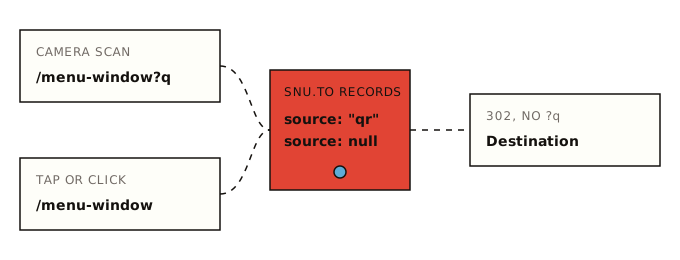
SendURL does this with a flag in the URL. The QR code encodes the short link with ?q on the end:
https://snu.to/menu-window?q    ← what the QR code encodes
https://snu.to/menu-window      ← what you paste into a post or an email
When a request arrives with ?q, the click is stored with source: "qr"; without it, source is null. Either way the phone is sent to the same destination, and the ?q is dropped: your page never sees it.
Here is a real click record for a scan, as GET /links/:id/clicks returns it (trimmed):
{
  "id": "a4c6e8f0-1b3d-4e5f-9a7b-2c4d6e8f0a1b",
  "clickedAt": "2026-10-14T08:03:11.482Z",
  "source": "qr",
  "country": "DE",
  "city": null,
  "device": "mobile",
  "os": "iOS",
  "browser": "Mobile Safari",
  "referer": null
}
And the link itself, from GET /links/:id, carries both totals:
{ "slug": "menu-window", "totalClicks": 42, "qrScans": 9 }Scans are a subset of clicks, not a separate count: 42 visits, 9 of them through the code. Every field is documented under the click object.
One code per placement
A single code on every poster, flyer and table card tells you the campaign worked, not which piece of paper did. Give each placement its own short link, all pointing at the same page:
| Placement | Short link | What you learn |
|---|---|---|
| Shop window poster | snu.to/menu-window | Passers-by, mostly outside opening hours? |
| Table cards | snu.to/menu-table | Diners, during service |
| Takeaway bag insert | snu.to/menu-bag | Scans at home, days later |
| Trade-show banner | snu.to/booth-hall3 | Should spike during the show; if not, the stand or the offer isn't working |
| Product packaging | snu.to/box-insert-2026 | A slow trickle over months |
| A5 flyer, October drop | snu.to/flyer-oct-a5 | One door-to-door round, compared with the next |
The timing is often as useful as the total. A banner that gets nothing during the event, or a bag insert that peaks the same evening, tells you something about where people actually had the phone out.
Put the placements of one campaign in their own project so they sit together. Naming patterns for larger campaigns are in the slug guide.
What scan data shows, and what it doesn't
| Shown for every scan | Not shown |
|---|---|
| Date and time (UTC in the API, your local time in the console) | Who scanned it. No name, email or account |
| Country, from the IP address (Cloudflare's lookup) | City, region or GPS position |
| Device type, vendor and model where the browser says (e.g. Apple iPhone) | Which camera app was used |
| Browser and OS with versions | Whether the person bought anything after landing |
| IP address and full user agent | Unique people: two scans by one person are two scans |
| Referrer, when the browser sends one (scans usually send none) | Scans of the same code made in another QR generator |
The console shows the same records per link, with charts by time; see per-click link analytics. Location stops at the country. An IP address points at a network, not a person, and VPNs, mobile carriers and corporate networks can put a scan in the wrong country. Treat the country column as a good guess.
The last row matters if you made codes elsewhere: only a code that encodes the ?q link labels its scans. A code from another generator that encodes snu.to/menu-window without ?q still counts every visit, but they show up as plain clicks.
Static vs dynamic QR codes
A static code encodes the final destination directly. Nothing sits in between, so nothing can count scans, and the destination can never change without reprinting.
A dynamic code encodes a redirect link. The provider counts scans at the redirect and lets you change where the redirect points.
A SendURL code is static in the strict sense: the pattern always encodes the same snu.to URL. It behaves like a dynamic code because the redirect behind it is yours to manage:
- Change the destination with
PATCH /links/:idin the API. Every printed copy follows within seconds. There's no console form for it; see change where a short link points. - Turn it off without deleting it, so a scan shows "Link not found" while the slug and history stay yours: disable a short link.
- Set an end date for an offer, after which a scan shows "Link expired" and isn't counted: expiring links.
What you can't change is the slug. It's printed into the pattern, so choose it before the print run.
Don't delete a link that's on paper. DELETE /links/:id frees the slug, and anyone can then claim snu.to/menu-window and receive your scans. Disable it instead.
Why scan counts can be off
The count is every request that reached the short link with ?q. That is close to "scans", but not identical:
- Repeat scans. One person scanning twice is two visits. SendURL has no unique-scan count.
- Shared scan URLs. If someone copies the address the code opened,
?qincluded, and pastes it into a chat, taps on it count as scans. Rare, but possible. - Link previews. If that pasted URL lands in Slack, iMessage or WhatsApp, the app's preview fetcher may follow it and add a visit. SendURL doesn't filter bots or previews; bot clicks and link previews shows how to spot them by user agent.
- Scans that don't count. A disabled, expired or password-protected link records nothing until the visitor gets through. A scan of a password link is counted only after the right password.
On the other side, a scan that never reaches the link isn't counted either: a code too small to read, glare on a glossy finish, or no signal in a basement venue. The print guide covers the first two.
QR codes in Google Analytics
If you also use GA4, put UTM parameters on the destination URL. The short link passes the destination through exactly as stored, so the UTMs arrive; anything added to the short link itself is not forwarded.
Destination stored on snu.to/menu-window:
https://example.com/menu?utm_source=window-poster&utm_medium=qr&utm_campaign=2026-10-autumn-menu
GA4's default channel group has rules for email, SMS, social, display and others, but none for qr, print or offline (Google's channel definitions, checked 15 October 2026). With a source that isn't on Google's lists, such as window-poster, the session lands in Unassigned.
Two fixes:
- Accept it and filter. Leave the channel as Unassigned and report on Session medium =
qr. The data is all there; it just isn't in a channel. - Add a custom channel group. In GA4, go to Admin → Data display → Channel groups, copy the default group and add a channel "QR / print" where Medium exactly matches
qr, placed above any channel that could also match (GA4 uses the first match). Google says custom channel groups apply to reports retroactively; a standard property can have two (custom channel groups).
Keep the medium lowercase and identical on every code, because GA4 report values are case-sensitive. The UTM parameters guide has the full parameter table and more examples.
GA4 and SendURL will disagree. GA4 counts sessions that loaded its tag after any consent banner; SendURL counts every scan that reached the redirect, including the person who closed the page before it loaded. Expect SendURL's number to be higher.
Pull scan counts with the API
The REST API works on every plan. First find the link's id; GET /links lists your links newest first, ten per page:
curl -s "https://api.sendurl.to/api/v1/links" \
  -H "Authorization: Bearer $SENDURL_API_KEY" \
  | jq -r '.links[] | "\(.id)  \(.slug)  clicks=\(.totalClicks)"'
Then the totals for one link:
curl -s "https://api.sendurl.to/api/v1/links/$LINK_ID" \
  -H "Authorization: Bearer $SENDURL_API_KEY" \
  | jq '{slug, totalClicks, qrScans}'
For scans per day, page through the clicks and split them by source. This Python script needs only requests (pip install requests):
import os
from collections import Counter

import requests

API = "https://api.sendurl.to/api/v1"
HEADERS = {"Authorization": f"Bearer {os.environ['SENDURL_API_KEY']}"}
LINK_ID = os.environ["LINK_ID"]

scans, taps, cursor = Counter(), Counter(), None
while True:
    params = {"limit": 10, **({"cursor": cursor} if cursor else {})}
    res = requests.get(f"{API}/links/{LINK_ID}/clicks", headers=HEADERS, params=params, timeout=10)
    res.raise_for_status()
    page = res.json()
    for click in page["clicks"]:
        day = click["clickedAt"][:10]  # UTC date
        (scans if click["source"] == "qr" else taps)[day] += 1
    cursor = page["pagination"]["nextCursor"]
    if not cursor:
        break

for day in sorted(scans.keys() | taps.keys()):
print(f"{day} scans {scans[day]:>4} taps {taps[day]:>4}")2026-10-14 scans 8 taps 17Each page holds up to ten clicks, so a link with 5,000 visits is 500 requests; the API allows 50 requests per 10 seconds from one IP address. For exports to CSV, retries and summaries, see the URL shortener API in Python and JavaScript.
Before you scan a code yourself
Codes in public places get covered with stickers. The US Federal Trade Commission's advice from 6 December 2023 is to "inspect the URL before you open it" when you see a code in an unexpected place (FTC consumer alert).
To read a code without opening it, take a photo or screenshot and drop it into a QR code scanner that shows the link inside and traces where it goes.
For anyone printing codes, that means two things. Make the link readable: camera apps show at least the domain before opening, and a slug that matches the poster looks like it belongs there. And check your own codes in place now and then, especially outdoor ones.
Checklist before printing
- One short link per placement, named so you can read the report later (
menu-window, notqr1) - Slug checked for case and look-alike characters; it can't change after printing
- Destination opens correctly on a phone, on mobile data, not just office Wi-Fi
- UTMs on the destination if you use GA4, with
utm_medium=qrand a plan for Unassigned - Code downloaded as SVG from the link's QR card, so it encodes the
?qURL - White border (quiet zone) kept, dark code on a light background, sized for the scan distance
- Proof printed at final size and scanned with three phones from real distance
- An expiry set if the offer ends; otherwise none, so old flyers keep working
- The link is never deleted while copies exist; disable it instead
- A date in your calendar to compare placements after the first week
Make a short link on the home page and download its code to try it, no account needed.
Frequently asked questions
Can you track how many times a QR code is scanned?
Yes, if the code opens a link that logs each visit, such as a short link. The code itself stores only a URL and counts nothing. Every scan of a SendURL code is counted as a click and labelled as a QR scan.
Can static QR codes be tracked?
Only indirectly. A code that encodes your own page URL can carry UTM parameters, so Google Analytics can count the sessions it starts, but nothing counts the scans themselves. A code that encodes a short link is counted at the redirect, before the page even loads.
Do QR codes track your location?
No. Scanning a code opens a URL in the browser, which shares no GPS position unless the page asks for permission. A link service sees the IP address. SendURL stores it and works out only the country from it; city, region and street are never recorded.
How do I track a QR code in Google Analytics?
Put UTM parameters on the destination URL, not on the short link. Note that GA4 has no default channel for utm_medium=qr, so those sessions land in Unassigned unless you add a custom channel group.
Do QR codes expire?
The printed pattern never expires: it is a fixed URL. What can stop is the link behind it. A SendURL link only stops if you set an expiry, disable it, or it reaches its visit limit of 100,000 on the Free plan.
Start tracking links free.
Create your first short link with click analytics in seconds. No credit card, no sign-up to start.
Shorten a link