A password does not make a custom link preview private
A custom preview and a password form serve different audiences. Keep the preview suitable for public sharing because a recognized social or chat unfurler can receive it before a human visitor reaches the password gate.
A team protects a proposal link with a password, then pastes the route into a chat. The card shows a customer name and a confidential proposal title. The password may still work for human visitors, but the card has already disclosed information on a different surface.
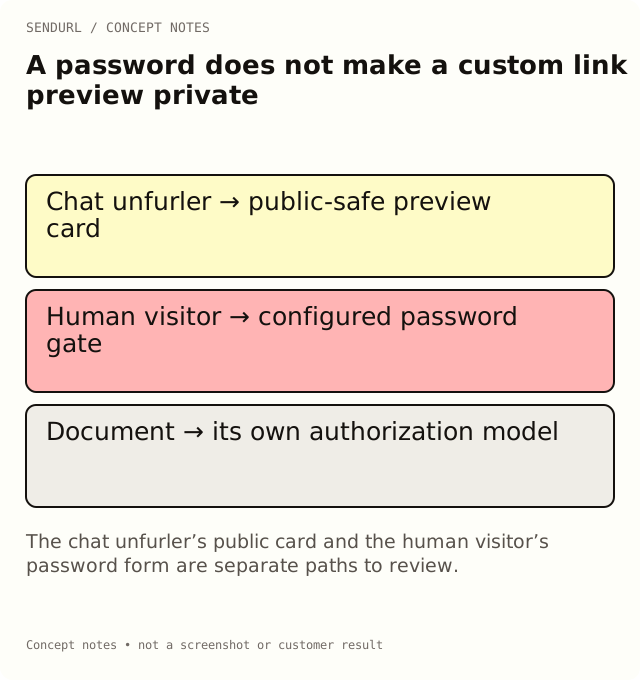
Treat the card as public presentation
A custom link preview contains a title, description and image intended for a social or messaging card. Its job is to explain the shared route before somebody opens the destination. That purpose makes it a poor place to put information that only an authorized document reader should see.
In SendURL, recognized social and chat unfurlers can receive the stored custom preview before the human password step. Search bots follow the ordinary redirect behavior instead. Do not assume one browser test represents every user agent that may request the address.
Follow a proposal example through both paths
Consider an illustrative route for a pricing proposal. A human follows the short link and is asked for the configured password. Separately, the chat service requests the same route to construct a preview card. If the stored title names the customer’s private project, the public presentation can expose that context without the human entering the password.
The appropriate repair is not to make the shared password longer while leaving the title unchanged. Replace the card with a neutral public promise, such as an approved resource description that does not identify the confidential transaction. Then verify the human access path and the app’s observed card as separate tests.
Keep document authorization at the destination
A short-link password is a shared route gate. It is not a complete document permission system and does not establish a reader’s identity. If the document needs named-account authorization, implement that in the destination system and test it using a representative recipient session.
Someone who obtains a destination through another path may not encounter the short-link gate. Likewise, expiring one route does not revoke every other permitted way to reach the document. Write the access model explicitly before assuming the shortener provides the entire confidentiality boundary.
Review the image as carefully as the title
A neutral title does not help if the preview image contains the proposal’s numbers, an account name or a screenshot of a private workspace. Inspect the actual image at the size in which the card will display. Review embedded labels and any information in the artwork, not just its filename.
Use a public-safe illustration when the route’s private context cannot be shown. A dashboard screenshot used to explain the product should contain synthetic information and be labelled accurately. An illustration is not evidence that a real recipient opened or accepted a proposal.
Understand caching during a repair
Editing the stored preview does not promise an instant update to every previously shared card. Social and chat apps have their own fetching and caching behavior. Record the exact route, app and observation time when checking a repair, and use that service’s supported refresh mechanism where available.
Do not claim that a successful browser visit or metadata inspection proves that every cached message is repaired. Keep the source configuration and the actual app observation separate until the mismatch is understood. This distinction prevents an access issue and a presentation-cache issue from being mixed into one unexplained “link problem.”
Know which account controls you need
Setting a password is Pro+. A custom preview is available on one saved link on Free, and on every link on paid plans. These are separate capabilities with separate purposes. Compare them in SendURL pricing rather than treating a preview quota as a security entitlement.
Removing the SendURL mark from account QR downloads is another Pro+ feature, unrelated to the confidentiality of the preview card. QR styling is a design choice, not a privacy control. Do not bundle those promises together in an approval note.
Verify the complete sharing decision
First approve what may be public in the card. Then test the human password path and the destination’s real authorization model. Finally inspect the card as observed in the intended app, noting any remaining cache limitation. Each observation answers a different question, so retain all three in the review record.
If the workflow needs an owned maintained route, create the SendURL account under the appropriate organization. Give the resource owner responsibility for future title, image and access changes. A password is not a reason to stop reviewing what the route publicly promises.
Further product explanations
Password Protect a Link describes the shared gate. Bot Clicks and Link Previews explains why preview retrieval can appear before a person follows a route.
Frequently asked questions
Is the password broken if a chat card appears first?
Not necessarily. The preview and the human gate are different response paths. Review the stored card’s public content separately.
Can a password-protected link have a confidential preview image?
Do not rely on the route password to hide the image. Use public-safe preview material and keep confidential content behind the destination’s authorization.
Does changing the preview erase every cached card?
No such guarantee is made. Verify the intended app’s actual card and follow its supported refresh process where available.
Can the password identify who read the document?
No. It is shared knowledge, not a named-account authorization record.
Start tracking links free.
Create your first short link with click analytics in seconds. No credit card, no sign-up to start.