Which destination wins when previews, passwords, app targets and A/B tests overlap?
A saved link can have several configured behaviors, but a request follows the supported precedence rather than every path at once. Review status, preview, password, mobile target and test eligibility before interpreting a result.
A team configures a custom card, a password, an app target and a destination test on one route. A chat preview looks correct, a phone opens the app and the variant report contains less traffic than expected. The settings can coexist while different request contexts exercise different paths.
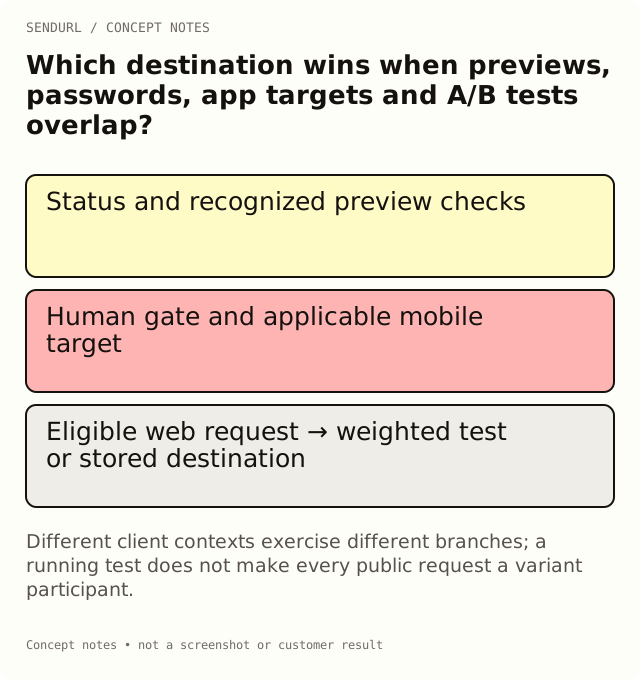
Status checks come before a useful journey
An inactive, deleted, expired or limit-stopped route cannot be understood by testing its intended destination alone. Confirm the link’s actual state and the exact hostname/path first. A saved alternative URL does not mean the route currently serves it.
Keep status failures separate from later routing questions. If the request stops at an unavailable route, changing a preview description will not repair the underlying lifecycle condition. Record the observed response and ask the owner responsible for that state.
A recognized unfurler can receive the custom preview
The custom preview is a response for recognized social or chat unfurlers. It can precede the human password path. Its purpose is the public card, not the full authenticated customer task.
That is why a confidential proposal should not put private information in its custom title or image merely because the human route has a password. Search bots follow the ordinary redirect behavior instead; do not assume one automated client represents every bot category.
A human password step is another path
When a human request encounters the configured password gate, the relevant target selection occurs through the supported protected journey. A correct password is shared route knowledge, not proof of a named document reader or an authorized application account.
The protected path only uses a web target. A non-web custom-scheme mobile target is not used there. Test that actual combination rather than treating an unrestricted app-link observation as approval of the password-protected journey.
Applicable mobile targets can precede a page split
On a relevant phone context, a configured mobile target takes precedence over the ordinary A/B destination split. A desktop-mode tablet may be treated as desktop, and recognized bots use the stored destination rather than behaving as ordinary experiment participants.
An experiment brief should therefore say who is eligible to reach the split. If most intended recipients use an app target, a web-page experiment may answer a narrower question than the team first assumed. Verify the relevant request contexts before drawing a performance conclusion.
Eligible human requests can use the weighted test
The A/B split allocates eligible requests according to configured weights and uses a per-link browser cookie for continuity. The presence of a running test does not mean every request to the public address appears as an ordinary variant observation.
Free allows one running two-variant test and keeps the stored destination as a variant with weight at least 50. Paid plans allow unlimited tests with up to four variants. Picking a winner that changes the stored destination requires Pro+. Those account rules are separate from request precedence.
Follow an illustrative setup campaign
Imagine a saved setup route with a neutral preview, an ordinary web page, mobile targets and a two-page experiment. A chat unfurler may obtain the public card. An applicable phone request may use its app target. A relevant ordinary human web request can reach the split, subject to the supported gate and state.
Write those expectations as a matrix before testing. For each row, record the actual client context, selected path, destination and task result. Do not mark an untested browser or device as passed because another context produced a pleasing result.
QR marking does not erase precedence
The QR address’s ?q marker identifies the recorded request source under the product’s rule. It does not force every request through the same destination path regardless of preview, password, app-target or test behavior.
If someone copies the marked address into another surface, the marker remains part of that request. Keep the route distributed, the client context and the observation distinct. A QR-labelled request is not automatic proof of a new physical scan or a unique customer.
Test the business task after the route choice
Selecting an app URL is not proof of an installation. Receiving an experiment variant is not a completed registration. Rendering a preview is not a human visit. Each later outcome belongs to its own supported measurement and access system.
For an approved campaign, verify that the visitor can complete the promised task after the selected path. Keep synthetic tests labelled and note when inspection requests can affect counts. An accurate routing matrix is more useful than a single “link works” checkbox.
Compare the current plan features before combining gated behaviors, then create the maintained route in SendURL under the owner responsible for all its paths. The SendURL REST API reference, A/B testing guide and password-link explanation provide the supported contracts around those settings.
Frequently asked questions
Why does my phone not appear to enter the landing-page test?
An applicable mobile target takes precedence. Confirm the actual request context and target before interpreting the test.
Can a preview appear before a password?
A recognized unfurler can receive the stored public preview separately from the human password step.
Does ?q force a request to ignore app targets?
No. The marker classifies the request source under its rule; it does not replace the supported routing precedence.
Is Pick winner on Free a destination-edit workaround?
No. A winner that changes the stored destination requires Pro+.
Start tracking links free.
Create your first short link with click analytics in seconds. No credit card, no sign-up to start.