Bot Clicks and Link Previews: Why Your Click Count Is High
Part of the Link tracking handbook
Link previews, email security scanners and crawlers follow short links, and each can count as a click. How each works, how to spot it, and how to subtract it.
Link preview bot clicks are the usual reason a link shows clicks nobody made. A short link counts every request that follows its redirect, and people aren't the only ones sending them: chat apps fetch a link to build its preview, email security scanners open links before delivery, and crawlers follow links they find.
SendURL counts all of these. It has no bot filter and no unique-click count, so this guide shows how to recognise automated clicks in your data and take them out yourself. It is part of the link tracking handbook.
What gets counted as a click
A click on a SendURL link is any request to snu.to/<slug> that gets the 302 redirect to the destination. The server doesn't know or care what sent it: a phone, a laptop, Slack's servers, a mail scanner, or curl on your own machine. A HEAD request counts too, so curl -I https://snu.to/<slug> adds one.
Some requests don't count: a disabled link (404), an expired link or one at its visit limit (410), and the password page of a protected link. A protected link counts only after the right password, which keeps preview bots off it.
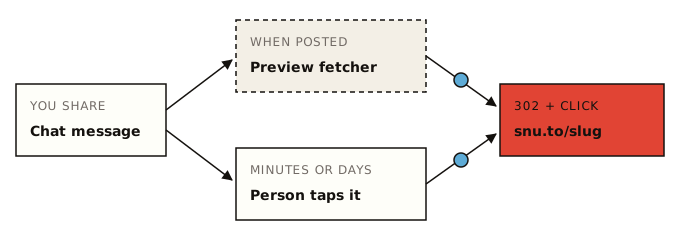
Link previews in chat apps
When you paste a link into a chat, the app fetches the page to read its title and image (its Open Graph tags) and draws a preview card. To reach the page, the fetcher has to follow the short link's redirect, and that request is a click.
What the platforms document:
- Slack fetches links "that Slack users post into their channels" as
Slackbot-LinkExpanding 1.0 (+https://api.slack.com/robots), does not honourrobots.txt, and caches the result "globally across the service for around 30 minutes" (Slack robots page). Post the same link twice within half an hour and you may see one fetch. - Facebook, Instagram and Messenger use
facebookexternalhit/1.1, which collects "the title, description, and thumbnail" for previews when content is shared in Meta's apps and may bypassrobots.txtfor security checks (Meta web crawlers). - Apple Messages builds rich previews and, in Apple's words, "Server-side redirects are followed" (TN3156, 2024-04-30). A short link is a server-side redirect, so the preview reaches it.
- X fetches cards as
Twitterbot, the name X's developer documentation used for its card crawler.
WhatsApp, Telegram, Discord and LinkedIn build previews too, but don't publish their fetchers' user agents. The names WhatsApp, TelegramBot, Discordbot and LinkedInBot appear in third-party bot lists; treat them as reported names that could change. Where WhatsApp and text-message previews come from, and how many to expect per send, is in tracking link clicks in WhatsApp and SMS.
To see which title and image those fetchers will find, run the link through the link preview checker. It follows the redirect too, so it adds one click of its own on a SendURL link.
Email security scanners
Corporate mail goes through security filters that check links before anyone reads the message:
- Microsoft Defender for Office 365 Safe Links: "URLs are scanned prior to message delivery", and URLs without a known reputation "are detonated asynchronously in the background" (Microsoft Learn, updated 2026-05-22).
- Mailchimp's help centre: "aggressive spam filters will click links in incoming mail before delivering them", which "can sometimes lead to an unusually high number of clicks" (Mailchimp).
- Klaviyo: "Bot clicks may be performed by inbox providers, mobile carriers, or third-party security software", and its exports mark them with a bot-click flag (Klaviyo help, updated 1 October 2025).
What to look for: a burst of clicks within seconds of a send, sometimes on every link in the message at once. A reader tends to click one or two links, minutes or hours later.
The user agents to look for
| Service | User agent contains | Source |
|---|---|---|
| Slack link previews | Slackbot-LinkExpanding | Documented by Slack |
| Facebook, Instagram, Messenger previews | facebookexternalhit | Documented by Meta |
| Meta AI fetching a link for a user | meta-externalfetcher | Documented by Meta |
| X cards | Twitterbot | Named in X's card docs (page no longer online) |
| WhatsApp previews | WhatsApp | Reported in bot lists, not documented |
| Telegram previews | TelegramBot | Reported in bot lists, not documented |
| Discord embeds | Discordbot | Reported in bot lists, not documented |
| LinkedIn previews | LinkedInBot | Reported in bot lists, not documented |
| Scripts and uptime checks | curl, python-requests, Go-http-client | Default user agents of those tools |
Email scanners are harder: they don't all announce themselves in the user agent. Timing catches them better than names do.
A user agent is just text the requester chooses to send, so a match is a strong hint. It proves nothing on its own.
Run the test yourself
Nobody publishes a per-app table of which previews hit a redirect, and apps change their behaviour. You can measure it for the apps your audience uses in about half an hour. Create one fresh link per app (the loop below needs jq), post each one where nobody will tap it (a chat with yourself, a private channel), wait ten minutes, and read the clicks. Every click on those links is automated.
for app in slack imessage whatsapp telegram discord teams linkedin messenger; do
  curl -s -X POST https://api.sendurl.to/api/v1/links \
    -H "Authorization: Bearer $SENDURL_API_KEY" \
    -H "Content-Type: application/json" \
    -d "{\"destinationUrl\": \"https://example.com/preview-test\", \"title\": \"preview test: $app\"}" \
    | jq -r '[.title, .id, .shortUrl] | @tsv'
done
Each link counts toward your plan's links (100 on Free). After posting, read each link's clicks with GET /links/:id/clicks and note four things per app: how many requests arrived, how many seconds after posting, the user agent, and the IP's country. Repeat every few months; previews change without notice.
Spot them in your data
The signals, strongest first:
- A known bot user agent from the table above.
- An empty user agent. Browsers always send one.
- No browser in the parsed record. SendURL parses each user agent; a bot's usually yields no browser name, and the device falls back to
desktop. So a click listed as "desktop" with no browser is a preview or a script far more often than a person. - Timing. Clicks within a minute of posting or sending, especially several at once.
- The same IP hitting every link in one email within a few seconds.
None of these is certain on its own. A person can click within a minute, and a scanner can borrow a Chrome user agent.
Filter them out with the API
This script reads every click of one link and splits them into people and automated clicks, with the reason for each. It flags; it doesn't delete. Keep the raw rows and report both numbers. The script needs requests (pip install requests).
import os, re, time
from collections import Counter
from datetime import datetime, timedelta

import requests

API = "https://api.sendurl.to/api/v1"
HEADERS = {"Authorization": f"Bearer {os.environ['SENDURL_API_KEY']}"}

# Slack, Meta and X document their names; the rest come from bot lists.
BOT_UA = re.compile(
    r"Slackbot|facebookexternalhit|meta-externalfetcher|Twitterbot|WhatsApp|TelegramBot|Discordbot|"
    r"LinkedInBot|bot/|crawler|spider|curl/|python-requests|Go-http-client|HeadlessChrome",
    re.I,
)
SENT_AT = datetime.fromisoformat(os.environ["SENT_AT"])  # when you posted, e.g. 2026-10-14T09:00:00+00:00
WINDOW = timedelta(seconds=60)

def clicks(link_id):
    params = {"limit": 10}
    while True:
        r = requests.get(f"{API}/links/{link_id}/clicks", headers=HEADERS, params=params, timeout=10)
        r.raise_for_status()
        page = r.json()
        yield from page["clicks"]
        if not page["pagination"]["hasMore"]:
            return
        params["cursor"] = page["pagination"]["nextCursor"]
        time.sleep(0.25)  # stay under the API's rate limit

def automated(click):
    """The reason a click looks automated, or None for a probable person."""
    ua = click["userAgent"] or ""
    if not ua:
        return "no user agent"
    if BOT_UA.search(ua):
        return "bot user agent"
    if not click["browser"]:
        return "no browser in user agent"
    at = datetime.fromisoformat(click["clickedAt"].replace("Z", "+00:00"))
    if SENT_AT <= at < SENT_AT + WINDOW:
        return "within 60 s of posting"
    return None

reasons = Counter(automated(c) or "person" for c in clicks(os.environ["LINK_ID"]))
people = reasons.pop("person", 0)
print(f"people: {people}, automated: {sum(reasons.values())}")
for reason, n in reasons.most_common():
    print(f"  {reason}: {n}")
Run it as LINK_ID=<id> SENT_AT=2026-10-14T09:00:00+00:00 python3 split_bot_clicks.py. The 60-second window is a judgement call: widen it for email (scanners can lag), narrow it for a chat post. The field names are in the click object reference, and the URL shortener API guide shows how to export the whole log to CSV.
What this means for email click rates
Email gets inflated twice, in different places:
- Opens are inflated by Apple Mail Privacy Protection, which "downloads remote content in the background by default" whether or not you engage with the email (Apple). That loads tracking pixels, not links.
- Clicks are inflated by the scanners above, and that touches your short links too.
So a short link in an email will usually show more clicks than your email tool reports as human clicks, if the tool filters bots. Compare the two after removing the first minute of short-link clicks. How to measure click-through rate covers which denominator to use, and link analytics vs web analytics covers why GA4 shows fewer still.
Checklist
- Note the time you post or send every tracked link
- Treat clicks in the first minute as suspect, and the first few seconds as likely automated
- Look for bot user agents, empty user agents, and "desktop" clicks with no browser
- Split people from automated clicks with the API, and keep the raw rows
- Test your channels: one fresh link per app, posted where nobody taps it
- Use a password-protected link when previews must not count (the password page never counts)
- Don't open your own links with
curl -Ior a link checker after posting; those count too
The record behind each click is described in what SendURL records per click, and the click detail is a free link tracker on every plan.
Frequently asked questions
Why did my link get clicks right after I sent it?
Most likely a preview or a scanner. Chat apps fetch a link to build its preview card, and email security services open links before delivering the message. Both follow the short link's redirect, so both count. Clicks within seconds of sending, with a bot user agent or no browser in the user agent, are the ones to suspect.
Do link previews count as clicks?
On SendURL, yes, whenever the preview fetch follows the short link's redirect. SendURL has no bot filter. Many link tools count them too; check whether yours filters, and how.
Does Microsoft click links in emails?
Microsoft Defender for Office 365's Safe Links scans URLs before the message is delivered, and detonates unknown ones in the background. That scan can register as a click on a tracked link, which is one reason clicks arrive the moment an email lands.
How do I filter bot clicks?
Pull the raw clicks through the API and tag each one: a known bot user agent, an empty user agent, no browser named, or a timestamp within a minute of sending. Report people and automated clicks side by side, and keep the raw rows.
Start tracking links free.
Create your first short link with click analytics in seconds. No credit card, no sign-up to start.
Shorten a link