Why editing a destination can change SendURL’s UTM grouping
SendURL groups requests using source, medium and campaign from each link’s current stored destination. The grouping is not a per-click archive of the UTM values that existed when somebody followed the route.
A link originally distributed in an email is later reused on a social profile. The owner edits its destination parameters, opens the UTM report and wonders why older activity now appears under the new label. This can follow from the report’s definition rather than a missing redirect or a retroactive change to website sessions.
Separate a link property from a recorded event
The stored destination is a current property of the saved link. SendURL’s UTM statistics read source, medium or campaign from that destination when grouping the selected request activity. They are not a historical snapshot of those parameters stored on every click.
Website analytics may have a different attribution model. Its session records and campaign handling belong to that system. Changing the saved destination today does not mean that a website session recorded last week is rewritten to match the new address.
Follow one illustrative route through an edit
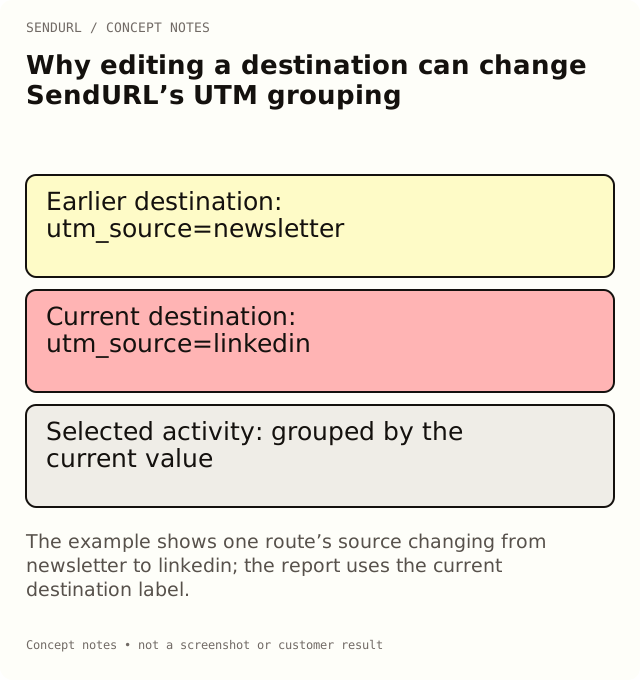
Suppose a saved launch route initially points to a page carrying utm_source=newsletter. It receives some requests while that destination is current. Later the owner edits the stored URL to use utm_source=linkedin and distributes the same short route in a profile.
In SendURL’s UTM grouping, the link’s current source is now linkedin. A selected period that includes earlier requests can therefore group that link’s activity under the current value. The report does not, by itself, separate the earlier email-era mapping from the later profile-era mapping.
This example explains the grouping model. It is not a measured campaign result or a claim that changing labels improves attribution. It shows why a maintained route and a historical campaign record serve different jobs.
Preserve history when placement context matters
If you need to distinguish the email placement from the profile placement, create separate saved links before distributing them. Give their internal titles clear placement meaning and keep a register of approved destinations. That preserves the distribution choice you made, although a route can still be copied or forwarded.
If the business needs one maintained public route instead, record the old destination, the new destination and the cutover time before editing. Retain relevant exports or report references as observations made at that time. A spreadsheet note does not change the product’s grouping, but it can prevent a later reviewer from inventing a historical interpretation.
Use the supported grouping fields
The UTM grouping offers source, medium and campaign. Do not promise a SendURL breakdown for content, term or a custom identifier merely because those parameters can appear in a destination URL. Keep the receiving system’s supported fields separate from the shortener’s current report dimensions.
For example, utm_content=hero may distinguish website analytics placements under the destination’s own rules. It does not create an additional SendURL content breakdown. A campaign dictionary should define where each field will actually be used.
Check the URL at creation and after an edit
Put campaign parameters on the stored destination before creating the short link. Adding them to the public short URL later does not make SendURL forward that query string to the destination. Confirm the final page reached from the distributed route and inspect its expected parameters.
After a permitted destination edit, repeat that route test and record the observation time. A dashboard save confirms a configuration action; the actual delivered journey is the separate verification that matters to the reader. Also check whether a social preview still reflects a cached earlier card, without confusing that card with the redirect target.
Know the two Pro+ boundaries
Advanced UTM statistics are Pro+. Changing an existing destination, including its UTM query values, is also Pro+. These are distinct capabilities: creating a tagged destination and saving a link is not the same action as modifying that saved destination later.
Review the plan comparison before choosing between separate campaign routes and a maintained address. Free’s seven-day dashboard history also affects when you can conduct a scoped review; a reporting plan should not rely on an unavailable older window.
Choose the report that answers your question
For current tagged-link activity, the SendURL grouping may be the useful view. For historical website sessions, use the destination analytics records with their own attribution and collection limits. For the exact address approved in an earlier campaign, use the dated distribution register or change record.
Do not force these records into one total just because they share a campaign name. State the system, window and definition behind each observation. A clear distinction is more useful than an apparently tidy report that cannot be reproduced.
Create the campaign’s placement links in SendURL once you have decided which distinctions need separate routes. For parameter roles and naming, use UTM Parameters: GA4 Rules, 25 Examples and Templates and the UTM naming guide.
Frequently asked questions
Does the UTM report store the destination parameters from each click?
No. The grouping reads the link’s current stored destination, so retain a separate history when earlier mappings matter.
Will a UTM edit rewrite past Google Analytics sessions?
Do not infer that from SendURL’s grouping. Website analytics stores and attributes its own events under its own rules.
Can I group SendURL activity by utm_content?
The supported UTM groupings are source, medium and campaign. Use another appropriate system for content-level analysis.
What is safer for comparing an email and a profile placement?
Create separate saved routes before distribution, then keep the placement-to-destination mapping. Forwarding still limits person-level interpretation.
See where your clicks come from.
Every short link tracks clicks by country, device, browser and referrer, on the Free plan too. No credit card, no sign-up to start.