Social Media Link Tracking: One Link per Placement
Social media link tracking that holds up: where each network allows a clickable link, one short link per placement, UTM values GA4 files correctly, and an ungated campaign sheet with code to create every link.
Social media link tracking means giving every place you post a link its own tracked short link, so each click is counted against the placement that earned it. Platform insights tell you about views and taps inside the app; one short link per placement tells you which bio slot, Story, post or DM actually sent people to your site, with the time, country and device of each click.
This is the hub of the social media handbook. It covers what every network has in common: where links work, how to name them, the UTM values, a tracking sheet and the code to create the links. The network guides go further: Instagram link tracking, Instagram Story link stickers, TikTok bio links, LinkedIn posts and WhatsApp and SMS.
Where you can post a clickable link
Last checked on 15 October 2026 against each platform's help pages or announcements. Platforms change these rules often, so check the app before a launch.
| Network | Placement | Clickable? | Note |
|---|---|---|---|
| Bio | Yes, up to 5 links | Edit profile > Links (Instagram Help Centre) | |
| Story | Yes, with the link sticker | All accounts since 27 October 2021, except new accounts and accounts that repeatedly break the rules (Instagram) | |
| Feed post and Reel captions | No, on most accounts | Meta One Advanced (from $49.99 a month) lists "links in organic posts and reels" (Meta, 15 Sep 2026) | |
| Direct messages | Yes | Opens in Instagram's in-app browser | |
| Ads | Yes, the action button | URL parameters set in Ads Manager | |
| Threads | Bio | Yes, up to 5 links | Meta, 2025 |
| Posts, comments, Page | Yes | Links pass through Meta's link shim | |
| TikTok | Bio | Yes, for eligible accounts | Eligibility depends on account type and region; check Edit profile (TikTok guide) |
| YouTube | Long-form descriptions and comments | Yes, with advanced features on | YouTube Help |
| YouTube | Shorts descriptions and comments | No | Same page: "non-clickable", to reduce spam. Channel profiles take up to 14 links |
| X | Posts | Yes | Every URL is wrapped in t.co and counts as 23 characters (X docs) |
| Posts, comments, profile | Yes | LinkedIn guide | |
| WhatsApp, SMS | Messages, groups | Yes | Usually arrive with no referrer (WhatsApp and SMS guide) |
| Poster, flyer, packaging | Through a QR code | Scans of a SendURL QR code are flagged as scans (QR guide) |
A short link adds nothing to a place where links aren't clickable. A URL typed into a Shorts description or an Instagram caption is plain text; the few people who copy it by hand still count, but don't plan a campaign around them.
Social media link tracking: one link per placement
The obvious way to split traffic by network is the referrer, the address of the page the click came from. It is unreliable on social:
- In-app browsers. Instagram, Facebook and TikTok open links inside their own apps. What reaches the destination as a referrer varies by app and version, and is often nothing.
- Link shims. Meta routes outbound links through its link shim, which is designed to tell the destination the visit came from Facebook while hiding the full address of the post (Meta Engineering, 2012).
- Chat apps. A link opened from WhatsApp, Telegram or an SMS usually carries no referrer at all.
- Browser defaults. Even when a referrer is sent, browsers send only the origin (
https://www.linkedin.com/), not the post, under the defaultstrict-origin-when-cross-originpolicy. On LinkedIn that leaves a post, a comment and a profile link looking the same, which is why the LinkedIn link tracking guide gives each its own short link.
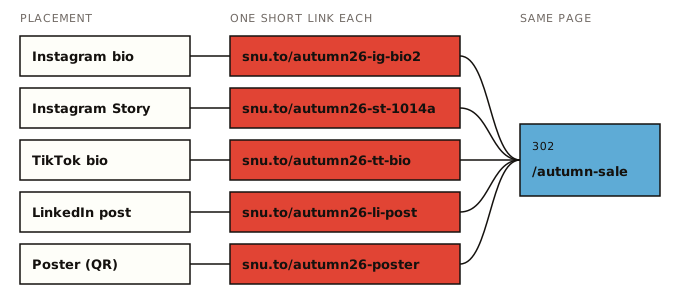
Separate links don't depend on any of that. If snu.to/autumn26-ig-bio2 only ever appears in your Instagram bio, every click on it came from the bio, referrer or not.
SendURL records each click with its time, country, device, browser, OS and referrer. When the click happens inside an app that names itself in its user agent, such as Instagram, Facebook or TikTok, the click's browser field is that app and browserType is inapp. That confirms the placement from a second angle: a bio-link click opened in Safari came from Instagram on the web, or from a copy of the link shared somewhere else.
The link tracking handbook explains what a click record contains and how the counting works.
SendURL counts every request that follows the link, including link previews that chat apps and Meta's crawler fetch when a link is pasted. It doesn't filter bots and doesn't count unique people. Why your click count is high shows how to spot those clicks.
How to name the links
Use one pattern for every campaign: <campaign>-<network>-<placement>.
| Network | Code | Example slug |
|---|---|---|
| Instagram bio | ig-bio + slot | autumn26-ig-bio2 |
| Instagram Story | st + date + frame | autumn26-st-1014a |
| Instagram DM reply | ig-dm | autumn26-ig-dm |
| TikTok bio | tt-bio | autumn26-tt-bio |
| LinkedIn post | li-post | autumn26-li-post |
| YouTube description | yt + video | autumn26-yt-ep12 |
| X post | x | autumn26-x-launch |
| WhatsApp broadcast | wa | autumn26-wa-vip |
| Creator | cr + handle | autumn26-cr-maya |
| Poster QR code | poster | autumn26-poster |
The rules that make this work on SendURL:
- Custom slugs are 1 to 32 characters: letters, digits,
-and_. - They are case-sensitive, so keep them lowercase. People retype slugs from posters and videos.
- Every link lives on the shared
snu.todomain, so a generic slug likesaleis probably taken. A campaign prefix avoids that. - A slug can't be changed after the link is created. Check it before it goes on anything printed.
How to name a custom short link has the full naming rules.
Add UTMs if you use GA4
The short link counts the click. Google Analytics needs UTM parameters to file the visit under the right channel. Put them on the destination URL (by hand, or with the free UTM builder, which shows the channel each one lands in), then shorten that URL:
https://example.com/autumn-sale?utm_source=instagram&utm_medium=social&utm_campaign=2026-10-autumn-sale&utm_content=bio-link-2SendURL redirects to the destination exactly as stored, so the UTMs arrive intact. Anything added to the short link itself (snu.to/autumn26-ig-bio2?utm_source=…) is not passed on.
Values that GA4's default channel rules file without surprises (Google's channel definitions and its source list, checked 15 October 2026):
| Network | utm_source | utm_medium | GA4 channel |
|---|---|---|---|
instagram | social | Organic Social | |
| Instagram ads | instagram | paid-social | Paid Social |
facebook | social | Organic Social | |
| TikTok | tiktok | social | Organic Social |
linkedin | social | Organic Social | |
| X | x | social | Organic Social (by the medium; x isn't on Google's list) |
| Threads | threads | social | Organic Social (by the medium; threads isn't on the list) |
| YouTube | youtube | video | Organic Video |
whatsapp | social | Organic Social | |
| Text message | sms | sms | SMS |
| Newsletter | newsletter | email |
Use utm_content for the placement (bio-link-2, story-1014-a, dm-reply) so GA4 can split the same campaign the way your slugs do. Two values to avoid: insta and ig_bio as a source with a made-up medium such as story. Neither matches a rule, so the visit lands in Unassigned. The UTM parameters guide has the full rules, and UTM naming conventions has an allowed-values list.
The tracking sheet
One row per placement, filled in before anything is posted. Columns:
| Column | Example | Why |
|---|---|---|
campaign | 2026-10-autumn-sale | Also the utm_campaign value |
network, placement | instagram, bio link 2 | What a person will recognise in six months |
slug, short_url | autumn26-ig-bio2, https://snu.to/autumn26-ig-bio2 | What you share |
destination_with_utm | the tagged URL | What the short link points at |
utm_source, utm_medium, utm_content | instagram, social, bio-link-2 | Kept separate so you can filter |
owner | priya | Who posts it |
goes_live_utc | 2026-10-13T09:00:00Z | Clicks are read against this |
expires_utc | empty, or the offer's end | Becomes the link's expiry |
notes | QR on A3 poster | Anything else |
The same sheet as CSV, ready to import into Google Sheets or Excel. expires_utc is empty here; fill it with the offer's end time (ISO 8601 with Z) for links that should stop working.
campaign,network,placement,slug,short_url,destination_with_utm,utm_source,utm_medium,utm_content,owner,goes_live_utc,expires_utc,notes
2026-10-autumn-sale,instagram,bio link 2,autumn26-ig-bio2,https://snu.to/autumn26-ig-bio2,https://example.com/autumn-sale?utm_source=instagram&utm_medium=social&utm_campaign=2026-10-autumn-sale&utm_content=bio-link-2,instagram,social,bio-link-2,priya,2026-10-13T09:00:00Z,,slot 2 of 5 labelled Autumn sale
2026-10-autumn-sale,instagram,story 14 Oct frame A,autumn26-st-1014a,https://snu.to/autumn26-st-1014a,https://example.com/autumn-sale?utm_source=instagram&utm_medium=social&utm_campaign=2026-10-autumn-sale&utm_content=story-1014-a,instagram,social,story-1014-a,priya,2026-10-14T17:30:00Z,,saved to Highlights
2026-10-autumn-sale,instagram,dm reply,autumn26-ig-dm,https://snu.to/autumn26-ig-dm,https://example.com/autumn-sale?utm_source=instagram&utm_medium=social&utm_campaign=2026-10-autumn-sale&utm_content=dm-reply,instagram,social,dm-reply,sam,2026-10-13T09:00:00Z,,pasted into replies to sale questions
2026-10-autumn-sale,tiktok,bio link,autumn26-tt-bio,https://snu.to/autumn26-tt-bio,https://example.com/autumn-sale?utm_source=tiktok&utm_medium=social&utm_campaign=2026-10-autumn-sale&utm_content=bio,tiktok,social,bio,sam,2026-10-13T09:00:00Z,,
2026-10-autumn-sale,linkedin,company page post,autumn26-li-post,https://snu.to/autumn26-li-post,https://example.com/autumn-sale?utm_source=linkedin&utm_medium=social&utm_campaign=2026-10-autumn-sale&utm_content=post-1015,linkedin,social,post-1015,priya,2026-10-15T08:00:00Z,,
2026-10-autumn-sale,email,october newsletter,autumn26-news,https://snu.to/autumn26-news,https://example.com/autumn-sale?utm_source=newsletter&utm_medium=email&utm_campaign=2026-10-autumn-sale&utm_content=cta-button,newsletter,email,cta-button,sam,2026-10-16T07:00:00Z,,expect scanner clicks in the first minutes
2026-10-autumn-sale,print,window poster,autumn26-poster,https://snu.to/autumn26-poster,https://example.com/autumn-sale?utm_source=poster&utm_medium=qr&utm_campaign=2026-10-autumn-sale&utm_content=window,poster,qr,window,priya,2026-10-12T10:00:00Z,,GA4 files this as Unassigned
To tag a whole column of destinations without formulas, paste them into the bulk UTM builder, which checks each row's GA4 channel and gives the list back as CSV. In Google Sheets, two formulas keep the derived columns honest (row 2, columns as above):
E2  ="https://snu.to/"&D2
F2  ="https://example.com/autumn-sale?utm_source="&G2&"&utm_medium="&H2&"&utm_campaign="&A2&"&utm_content="&I2
The poster row is deliberate: utm_medium=qr matches no GA4 default rule, so those visits show as Unassigned. The SendURL link still counts every scan, flagged as a scan. How to track QR code scans covers the two fixes on the GA4 side.
Create every link from the sheet
You can create the links one by one in the console, or let the REST API read the sheet. Create an API key in the console, keep it in SENDURL_API_KEY, export the sheet as campaign.csv, and run:
#!/usr/bin/env bash
# One SendURL link per row of campaign.csv (header row first).
# Needs curl, jq and SENDURL_API_KEY. Destination URLs must not contain commas.
set -euo pipefail
API="https://api.sendurl.to/api/v1"
res=$(mktemp)

tail -n +2 campaign.csv | while IFS=, read -r campaign network placement slug short_url destination utm_source utm_medium utm_content owner goes_live expires notes; do
  body=$(jq -n --arg d "$destination" --arg s "$slug" --arg t "$campaign: $network $placement" --arg e "$expires" \
    '{destinationUrl: $d, slug: $s, title: $t} + (if $e == "" then {} else {expiresAt: $e} end)')
  status=$(curl -s -o "$res" -w '%{http_code}' -X POST "$API/links" \
    -H "Authorization: Bearer $SENDURL_API_KEY" \
    -H "Content-Type: application/json" \
    -d "$body")
  case "$status" in
    201) jq -r '"\(.slug)\t\(.shortUrl)\t\(.id)"' "$res" ;;
    409) echo "$slug: already taken on snu.to, pick another slug" >&2 ;;
    *)   echo "$slug: HTTP $status $(cat "$res")" >&2 ;;
  esac
  sleep 0.3
done
rm -f "$res"
Each created link prints its slug, short URL and id. A 409 means someone already uses that slug; change it in the sheet and run the script again (rows that succeeded will also report 409 the second time, which is harmless). The same in Node.js 18 or later, with no dependencies:
// node create-links.mjs campaign.csv
import { readFileSync } from "node:fs";

const API = "https://api.sendurl.to/api/v1";
const [header, ...rows] = readFileSync(process.argv[2], "utf8").trim().split(/\r?\n/);
const cols = header.split(",");

for (const line of rows) {
  const cells = line.split(",");
  const row = Object.fromEntries(cols.map((c, i) => [c, cells[i] ?? ""]));
  const body = {
    destinationUrl: row.destination_with_utm,
    slug: row.slug,
    title: `${row.campaign}: ${row.network} ${row.placement}`,
    ...(row.expires_utc ? { expiresAt: row.expires_utc } : {}),
  };
  const res = await fetch(`${API}/links`, {
    method: "POST",
    headers: { Authorization: `Bearer ${process.env.SENDURL_API_KEY}`, "Content-Type": "application/json" },
    body: JSON.stringify(body),
  });
  if (res.status === 201) {
    const link = await res.json();
    console.log(`${link.slug}\t${link.shortUrl}\t${link.id}`);
  } else if (res.status === 409) {
    console.error(`${row.slug}: already taken on snu.to, pick another slug`);
  } else {
    console.error(`${row.slug}: HTTP ${res.status} ${await res.text()}`);
  }
  await new Promise((r) => setTimeout(r, 300));
}
Seven links fit easily in the Free plan's 100. Each one also has a QR code (PNG or SVG in the console), so the poster row needs no extra tool.
Reading the results after 7 days
Pick the reading day before you post. Seven days suits most campaigns, and it matches the Free plan's 7 days of analytics history (Pro lists 30); the link page and the API cover every click. This loop prints the click total of every link in the campaign:
API="https://api.sendurl.to/api/v1"
cursor=""
while :; do
  page=$(curl -s "$API/links?limit=10${cursor:+&cursor=$cursor}" -H "Authorization: Bearer $SENDURL_API_KEY")
  echo "$page" | jq -r '.links[] | select(.slug | startswith("autumn26-")) | "\(.slug)\t\(.totalClicks)"'
  [ "$(echo "$page" | jq -r '.pagination.hasMore')" = "true" ] || break
  cursor=$(echo "$page" | jq -r '.pagination.nextCursor')
  sleep 0.3
done
What to compare, in this order:
- Clicks per day live. A bio link live for 7 days and a Story link live for 1 can't be compared on totals. Divide by the days each was up.
- Previews and scanners. Clicks within seconds of posting, from a crawler user agent such as
facebookexternalhit, are not people. Subtract them before ranking placements (bot clicks and link previews). - The shape over time. A Story's clicks arrive within hours and stop; a bio link keeps collecting. That says how often to refresh each placement. On TikTok, where one bio link serves every video, the same timestamps show which TikTok video drove the clicks.
- Device and country. If 90% of a placement's clicks come from phones, check the landing page on a phone. A country you didn't target is worth a look at the ad or creator behind it.
- GA4, if you tagged. Sessions will be lower than clicks (consent banners, ad blockers, people who leave before the page loads). Compare the ranking of placements, not the raw numbers.
Click timestamps also answer when your audience clicks, which the published "best time to post" studies don't: they measure likes, comments and other engagement, mostly from big accounts. Find your best time to post from link clicks turns the timestamps into a weekday-by-hour heatmap.
Per-network guides
- Instagram link tracking: bio links, DMs, ads, creators, targeting and timing for an Instagram campaign.
- Instagram Story link stickers: one link per frame, the first 24 hours, Highlights and expiry.
- TikTok bio links: which video drove the clicks when there's only one link.
- LinkedIn posts: post body or first comment, and one link per author.
- WhatsApp and SMS: tracking links in chats that send no referrer.
Launch checklist
- Every placement has a row in the sheet: slug, tagged destination, owner, go-live time
- Slugs are lowercase, start with the campaign prefix, and are checked for typos
- UTMs are on the destination URL, with
utm_contentnaming the placement - Links created (console or script) and each one opened once on a phone; that test counts as a click, so note it
- Links for time-limited offers have an expiry set
- Printed pieces use the link's QR code as SVG, tested at final size
- Short links posted only where they are clickable (not in Instagram captions or Shorts descriptions)
- Reading day in the calendar, with the comparison plan above
Make the first link of your campaign on the SendURL home page, or see what each click records on the free link tracker page.
Frequently asked questions
How do I track clicks from social media?
Give every place you post a link its own tracked short link, all pointing at the same page. Each click is then counted against the placement that earned it, with its time, country and device. If you use Google Analytics, add UTM parameters to the destination URL before you shorten it.
What is the best way to track social media campaigns?
Plan the placements before you post: one short link per bio slot, Story, post, DM reply, creator and printed QR code, recorded in a sheet with its slug, UTM values and go-live time. Then compare clicks per placement after a fixed period, such as 7 days, with link previews discounted.
Do links reduce reach on social media?
None of the platforms covered in this guide publishes a rule that says so. If you want to know for your own account, test it: post comparable content with the link in the post and in the first comment or bio, give each version its own short link, and compare reach and clicks.
Start tracking links free.
Create your first short link with click analytics in seconds. No credit card, no sign-up to start.
Shorten a link