UTM Parameters: GA4 Rules, 25 Examples and Templates
UTM parameters are tags on the end of a URL that tell Google Analytics 4 where a visit came from. GA4 reads nine of them and files each visit into a channel by fixed rules; 25 tagged links below land where you expect.
UTM parameters are tags added to the end of a URL, such as ?utm_source=newsletter&utm_medium=email&utm_campaign=2026-10-autumn-sale, that tell Google Analytics 4 where a visit came from. GA4 reads them when the page loads and uses utm_source and utm_medium to decide which channel the session belongs to.
This guide covers the nine parameters GA4 reads, the exact rules it uses to turn them into channels, and 25 UTM parameter examples that pass those rules. Every block is ready to copy. Google's own pages are quoted as of 15 October 2026. To tag a single link without code, use the free UTM builder.
The nine UTM parameters GA4 reads
| Parameter | What it's for (Google's examples) | Use it? | Fills this GA4 dimension |
|---|---|---|---|
utm_source | The referrer: google, newsletter4, billboard | Always | Session source, Manual source |
utm_medium | The marketing medium: cpc, banner, email | Always | Session medium, Manual medium |
utm_campaign | Product, slogan or promo code: spring_sale | Always | Session campaign, Manual campaign name |
utm_id | Campaign ID, the same one you use when uploading campaign data | Recommended | Manual campaign ID |
utm_source_platform | The platform directing the traffic, e.g. Search Ads 360 | If you buy through one | Manual source platform |
utm_content | Tells creatives apart, e.g. two call-to-action links in one email | When one campaign has several placements | Manual ad content |
utm_term | The paid keyword | Paid search only | Manual term |
utm_creative_format | Creative type: display, native, video, search | No | Not reported |
utm_marketing_tactic | Targeting: remarketing, prospecting | No | Not reported |
The parameter list and examples come from Google's URL builders help page, which says the last two "isn't currently reported in Google Analytics properties". The dimension names come from Google's dimensions and metrics reference.
Three more facts from the same page that save debugging time:
- "You can add parameters to a URL in any order."
- "Missing UTM parameters will result in (not set) values being present in reporting."
- UTMs are left out of the Landing page + query string dimension and show up in Page location instead.
Which UTM parameters you need
Google's rule is short: "When you add parameters to a URL, you should always use utm_source, utm_medium, and utm_campaign." Those three decide the channel and the campaign row. Leave one out and that column reads (not set).
Add the others only when they answer a question you will actually ask:
utm_contentwhen one campaign sits in several places (bio link 2, a Story on 14 October, the email's hero button) and you want to compare them.utm_termfor the keyword on manually tagged paid search.utm_idif you import cost data into GA4, or want a campaign key that doesn't change when someone renames the campaign.
How GA4 files your traffic: medium to channel
GA4 puts every session into one channel of its default channel group. For traffic you tag yourself, the rule is decided by utm_source, utm_medium and, in two cases, utm_campaign. These are Google's rules for manually tagged traffic, in the order its default channel group page lists them:
| Channel | Rule (Google's wording, condensed) | Values that work |
|---|---|---|
| Cross-network | Campaign name contains "cross-network" | Don't use it in campaign names |
| Paid Shopping | Source is a shopping site, or campaign name matches the shopping pattern, and medium is paid | Avoid "shop" in campaign names (see below) |
| Paid Search | Source is a search site and medium matches ^(.*cp.*|ppc|retargeting|paid.*)$ | bing + cpc |
| Paid Social | Source is a social site and medium is paid | facebook + paid-social |
| Paid Video | Source is a video site and medium is paid | youtube + paid-video |
| Display | Medium is one of display, banner, expandable, interstitial, cpm | display, banner |
| Paid Other | Medium matches the paid pattern | Paid traffic from a source on no list |
| Organic Shopping | Source is a shopping site, or campaign name matches the shopping pattern | Same as above |
| Organic Social | Source is a social site, or medium is one of social, social-network, social-media, sm, social network, social media | social |
| Organic Video | Source is a video site, or medium matches ^(.*video.*)$ | video |
| Organic Search | Source is a search site, or medium is exactly organic | Rarely tagged by hand |
| AI Assistant | Medium is exactly ai-assistant | Set by GA4, not by you |
| Referral | Medium is one of referral, app, link | referral |
Source or medium is email, e-mail, e_mail or e mail | email | |
| Affiliates | Medium is affiliate | affiliate |
| Audio | Medium is exactly audio | audio |
| SMS | Source or medium is exactly sms | sms |
| Mobile Push Notifications | Medium ends with "push", or contains "mobile" or "notification", or source is firebase | push |
| Unassigned | "the value Analytics uses when there are no other channel rules that match the event data" | What you want to avoid |
"Source is a social site" means the source appears in Google's list of sources and categories, a PDF dated 9 February 2023 with 592 social, 129 search, 52 shopping and 46 video entries. When we checked it, facebook, fb, instagram, ig, linkedin, tiktok, twitter, t.co, whatsapp, pinterest and reddit were on the social list and youtube on the video list. insta, x, threads and bsky are not on any list, so they only reach Organic Social when the medium is social. Google's own best-practice table suggests insta as an Instagram source, which its list doesn't contain.
Four traps that catch people out, all read from the rules above:
organic-socialis not a social medium. It only works when the source is on the list.utm_source=x&utm_medium=organic-sociallands in Unassigned.- Any medium containing
cpcounts as paid.cpc,cpmandcpaall match.cpmalso matches Display, sofacebook+cpmfits Paid Social, Display, Paid Other and Organic Social at once. - A medium containing "mobile" or "notification" is Mobile Push Notifications.
utm_medium=mobile-socialmatches Mobile Push Notifications as well as whatever the source says. - "shop" in a campaign name can pull the session into Shopping. The pattern matches "shopping" anywhere, and "shop" at the start, after any character that isn't a letter or after the letter e.
2026-11-shop-launchmatches;workshop-2026doesn't.
Case doesn't change the channel: Google says "Channel definitions aren't case sensitive". It does change the report rows, because "Parameter values are case sensitive, e.g. utm_source=google is different from utm_source=Google." Use lowercase and the question never comes up.
Google lists these rules in order but doesn't say whether the default group stops at the first match. Every unpaid example below fits exactly one channel. The paid ones also fit Paid Other and an organic channel, which can't be avoided: a specific paid rule above them is the only way Paid Social, Paid Search or Paid Video ever gets reported. Outside that case, when a value could fit two channels, pick one that fits only one.
The UTM naming convention guide turns this table into an allowed-values list for your team, and why GA4 files UTM traffic as Unassigned works through the failures one by one.
25 UTM examples by channel
Every example uses one campaign, 2026-10-autumn-sale, so you can see how source, medium and content change while the campaign stays put. Swap in your own page and names; keep the patterns.
https://example.com/autumn-sale?utm_source=newsletter&utm_medium=email&utm_campaign=2026-10-autumn-sale&utm_content=hero-button
https://example.com/autumn-sale?utm_source=newsletter&utm_medium=email&utm_campaign=2026-10-autumn-sale&utm_content=footer-link
https://example.com/welcome?utm_source=onboarding-drip&utm_medium=email&utm_campaign=welcome-series&utm_content=day-3
The source names the list or sender. utm_medium=email is what puts it in Email; utm_medium=newsletter would put it in Unassigned.
Organic social
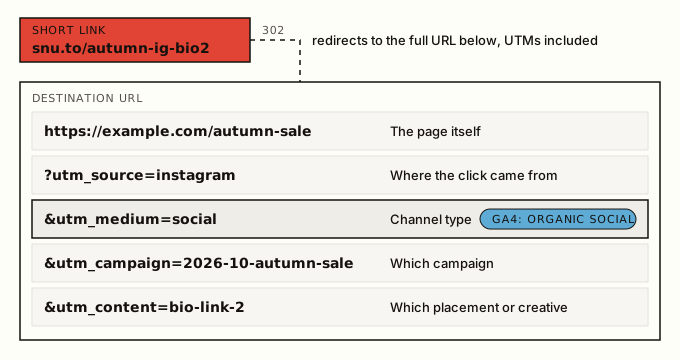
https://example.com/autumn-sale?utm_source=instagram&utm_medium=social&utm_campaign=2026-10-autumn-sale&utm_content=bio-link-2
https://example.com/autumn-sale?utm_source=instagram&utm_medium=social&utm_campaign=2026-10-autumn-sale&utm_content=story-2026-10-14
https://example.com/autumn-sale?utm_source=facebook&utm_medium=social&utm_campaign=2026-10-autumn-sale&utm_content=page-post
https://example.com/autumn-sale?utm_source=linkedin&utm_medium=social&utm_campaign=2026-10-autumn-sale&utm_content=company-post
https://example.com/autumn-sale?utm_source=tiktok&utm_medium=social&utm_campaign=2026-10-autumn-sale&utm_content=bio
https://example.com/autumn-sale?utm_source=x&utm_medium=social&utm_campaign=2026-10-autumn-sale&utm_content=pinned-post
https://example.com/autumn-sale?utm_source=threads&utm_medium=social&utm_campaign=2026-10-autumn-sale&utm_content=bio-link-1
The first five qualify twice (source on Google's social list, medium social). The X and Threads lines qualify only through the medium, which is why social matters more than the source here. Placement ideas per network are in the social media link tracking guide and, for bio links and Stories, the Instagram link tracking guide.
Paid social
https://example.com/autumn-sale?utm_source=facebook&utm_medium=paid-social&utm_campaign=2026-10-autumn-sale&utm_content=carousel-a
https://example.com/autumn-sale?utm_source=linkedin&utm_medium=paid-social&utm_campaign=2026-10-autumn-sale&utm_content=sponsored-post
https://example.com/autumn-sale?utm_source=tiktok&utm_medium=paid-social&utm_campaign=2026-10-autumn-sale&utm_content=video-ad-1
paid-social matches the paid pattern through paid.*. The source has to be on the social list: x + paid-social lands in Paid Other. For X ads, twitter is the value Google's list knows.
Video
https://example.com/autumn-sale?utm_source=youtube&utm_medium=video&utm_campaign=2026-10-autumn-sale&utm_content=description-link
https://example.com/autumn-sale?utm_source=youtube&utm_medium=paid-video&utm_campaign=2026-10-autumn-sale&utm_content=bumper-6s
Use video, not social, for YouTube: youtube is on the video list, and social would make it fit Organic Social too.
Paid search and display
https://example.com/autumn-sale?utm_source=bing&utm_medium=cpc&utm_campaign=2026-10-autumn-sale&utm_term=winter-boots
https://example.com/autumn-sale?utm_source=weather-news&utm_medium=display&utm_campaign=2026-10-autumn-sale&utm_content=300x250
Google Ads is the exception: let auto-tagging do it (see below).
SMS and chat
https://example.com/autumn-sale?utm_source=text-club&utm_medium=sms&utm_campaign=2026-10-autumn-sale&utm_content=launch-text
https://example.com/autumn-sale?utm_source=whatsapp&utm_medium=social&utm_campaign=2026-10-autumn-sale&utm_content=channel-post
Don't use whatsapp + sms: WhatsApp is on the social list and sms is the SMS rule, so the pair fits two channels.
QR codes and print
https://example.com/autumn-sale?utm_source=poster&utm_medium=qr&utm_campaign=2026-10-autumn-sale&utm_content=store-window
https://example.com/autumn-sale?utm_source=flyer&utm_medium=qr&utm_campaign=2026-10-autumn-sale&utm_content=market-stall
GA4 has no print or QR channel, so any accurate value lands in Unassigned. Keep qr anyway and add a "QR & print" channel to a custom channel group (medium exactly matches qr). Borrowing referral or social to dodge Unassigned files poster scans as something they aren't. If you put the code on a short link, SendURL marks scans separately without GA4 at all: see how to track QR code scans.
Audio, partners and push
https://example.com/autumn-sale?utm_source=making-it-podcast&utm_medium=audio&utm_campaign=2026-10-autumn-sale&utm_content=ep-112-show-notes
https://example.com/autumn-sale?utm_source=ana-lopez&utm_medium=affiliate&utm_campaign=2026-10-autumn-sale&utm_content=creator-post
https://example.com/autumn-sale?utm_source=acme-partners&utm_medium=referral&utm_campaign=2026-10-autumn-sale&utm_content=partner-newsletter
https://example.com/autumn-sale?utm_source=app&utm_medium=push&utm_campaign=2026-10-autumn-sale&utm_content=reminder-1
podcast as a medium lands in Unassigned; audio is the value with a rule.
Case, spaces and characters
- Lowercase everything. Google's best-practice table: "Use lowercase as a standard practice."
- Hyphens between words.
autumn-sale, notAutumn Sale. A space becomes%20or+in the URL and makes a new report row the first time someone types it differently. - Encode reserved characters.
&,=,?and#inside a value break the URL. The code below encodes them for you; better still, don't use them. - The query comes before the fragment.
https://example.com/page?utm_source=newsletter#pricingis right. Inhttps://example.com/page#pricing?utm_source=newslettereverything after#is the fragment, so there is no query string for GA4 to read. - Append with
&if the URL already has a query.https://example.com/p?id=42&utm_source=newsletter, never a second?.
Build UTM links in code
JavaScript
// Build a tagged URL: lowercase, hyphens for spaces, existing query and #fragment kept.
function tag(url, params) {
  const u = new URL(url);
  for (const [key, value] of Object.entries(params)) {
    if (value) u.searchParams.set(`utm_${key}`, String(value).trim().toLowerCase().replace(/\s+/g, "-"));
  }
  return u.toString();
}

console.log(
  tag("https://example.com/autumn-sale", {
    source: "instagram",
    medium: "social",
    campaign: "2026-10-autumn-sale",
    content: "Bio link 2",
  }),
);
// https://example.com/autumn-sale?utm_source=instagram&utm_medium=social&utm_campaign=2026-10-autumn-sale&utm_content=bio-link-2
Python
from urllib.parse import parse_qsl, urlencode, urlsplit, urlunsplit


def tag(url, **utm):
    """Add utm_* parameters; keeps the existing query and #fragment."""
    parts = urlsplit(url)
    new = {f"utm_{k}": "-".join(str(v).lower().split()) for k, v in utm.items() if v}
    query = [(k, v) for k, v in parse_qsl(parts.query, keep_blank_values=True) if k not in new]
    return urlunsplit(parts._replace(query=urlencode(query + list(new.items()))))


print(tag("https://example.com/autumn-sale?id=42#sizes",
          source="newsletter", medium="email", campaign="2026-10-autumn-sale", content="Hero button"))
# https://example.com/autumn-sale?id=42&utm_source=newsletter&utm_medium=email&utm_campaign=2026-10-autumn-sale&utm_content=hero-button#sizes
Google Sheets
Put the page URL in column A and source, medium, campaign and content in B to E, then paste this in F2 and fill down:
=A2 & IF(ISNUMBER(FIND("?", A2)), "&", "?") & "utm_source=" & ENCODEURL(SUBSTITUTE(LOWER(TRIM(B2)), " ", "-")) & "&utm_medium=" & ENCODEURL(SUBSTITUTE(LOWER(TRIM(C2)), " ", "-")) & "&utm_campaign=" & ENCODEURL(SUBSTITUTE(LOWER(TRIM(D2)), " ", "-")) & IF(E2 = "", "", "&utm_content=" & ENCODEURL(SUBSTITUTE(LOWER(TRIM(E2)), " ", "-")))It adds & instead of ? when the page URL already has a query. It doesn't handle a #fragment in column A, so keep those out of the sheet. If your spreadsheet locale uses semicolons between arguments, swap the commas.
To flag a bad value, check each cell against the lowercase-and-hyphens pattern:
=AND(REGEXMATCH(B2, "^[a-z0-9]+(-[a-z0-9]+)*$"), REGEXMATCH(C2, "^[a-z0-9]+(-[a-z0-9]+)*$"), REGEXMATCH(D2, "^[a-z0-9]+(-[a-z0-9]+)*$"), OR(E2 = "", REGEXMATCH(E2, "^[a-z0-9]+(-[a-z0-9]+)*$")))Put UTMs behind a short link
A tagged URL is long and ugly, which is fine in an ad's URL field and bad on a poster, in a bio or read aloud on a podcast. Shorten the whole tagged URL. The UTMs are part of the destination, so they arrive intact.
With SendURL you can paste the tagged URL into the box on the home page (no account needed) or create it from code. This creates a link with a random slug and prints its short URL:
curl -X POST https://api.sendurl.to/api/v1/links \
  -H "Authorization: Bearer $SENDURL_API_KEY" \
  -H "Content-Type: application/json" \
  -d '{
    "destinationUrl": "https://example.com/autumn-sale?utm_source=instagram&utm_medium=social&utm_campaign=2026-10-autumn-sale&utm_content=bio-link-2",
    "title": "Autumn sale: Instagram bio link 2"
}'{
"id": "5d8f2a1c-7b3e-4c9d-a0e1-6f2b8c4d1e7a",
"slug": "x7Kp2",
"destinationUrl": "https://example.com/autumn-sale?utm_source=instagram&utm_medium=social&utm_campaign=2026-10-autumn-sale&utm_content=bio-link-2",
"title": "Autumn sale: Instagram bio link 2",
"active": true,
"shortUrl": "https://snu.to/x7Kp2",
"qrUrl": "https://snu.to/x7Kp2?q",
…
}Add "slug": "autumn-ig-bio2" to the body for a readable link. Slugs are unique across SendURL, so a taken one returns 409 slug_taken. The full request and response are in the API reference.
Check the redirect before you post it, with curl or the redirect checker:
curl -sI https://snu.to/x7Kp2 | grep -i '^location'
# location: https://example.com/autumn-sale?utm_source=instagram&utm_medium=social&utm_campaign=2026-10-autumn-sale&utm_content=bio-link-2
That request is a real visit, so it shows up as one click (user agent curl). Two limits to know:
- SendURL has no UTM fields in the console. It stores the destination you give it and redirects to it as stored; to add the tags first, use the free UTM builder.
- A query string added to the short link itself, like
snu.to/x7Kp2?utm_source=x, is not passed on. Tags go on the destination.?qis the one exception: it marks a QR scan and is dropped.
The step-by-step version, with mistakes to avoid, is in how to shorten a UTM link. The short link also gives you something UTMs can't: a count of every click, with country, device and referrer, whether or not GA4 loads on the page. That's what the free link tracker shows.
The other direction: when you pass on a link someone else tagged, their utm_ values, fbclid or gclid travel with it and credit their campaign. The URL cleaner removes them and keeps the parameters the page needs. Don't run it on your own campaign links.
Don't tag internal links
UTMs belong on links that bring people to your site from somewhere else. A link from your home page to your pricing page should never carry them.
The reason is in Google's sessions and campaigns page: "Each session is associated with only one campaign or traffic source and a new session is not started when Google Analytics encounters a new campaign or traffic source." An internal UTM can't start a clean new session, and it muddles the source the visitor really came from. Use events or the page path to study movement inside your site.
Google Ads auto-tagging overrides manual UTMs
If Google Ads auto-tagging is on, adding UTMs to those ads doesn't change their channel. Google's auto-tagging page: "If you use manual tagging and auto tagging together, then the source, medium, and other traffic-classification dimensions use the auto-tagged values." Your manual utm_content and utm_term still fill Manual ad content and Manual term. Keep auto-tagging on and tag everything else by hand.
Read your UTM traffic in GA4
The standard report: Reports → Acquisition → Traffic acquisition. Its default dimension is the session's channel. Click + next to the dimension drop-down and add Session source / medium as a secondary dimension to see the values behind each channel.
For one campaign across every placement, build a free-form exploration:
Dimensions:  Session campaign, Session source / medium, Session manual ad content, Session default channel group
Metrics:     Sessions, Engaged sessions, Key events
Rows:        Session source / medium, then Session manual ad content
Filter:      Session campaign exactly matches 2026-10-autumn-sale
Expect GA4's sessions to be lower than your short link's click count. Link previews and email scanners fetch links without running GA4, people who leave before the page loads never reach it, and consent banners and blockers keep some real visits out. The bot clicks and link previews guide covers the gap.
Template and pre-launch checklist
Copy this block into your campaign doc and fill one line per placement:
Page:      https://example.com/<page>
Campaign:  <yyyy-mm>-<offer>                          e.g. 2026-10-autumn-sale

Email      ?utm_source=<list-name>&utm_medium=email&utm_campaign=<campaign>&utm_content=<link-position>
Organic    ?utm_source=<network>&utm_medium=social&utm_campaign=<campaign>&utm_content=<placement>
Paid       ?utm_source=<network>&utm_medium=paid-social&utm_campaign=<campaign>&utm_content=<ad-name>
YouTube    ?utm_source=youtube&utm_medium=video&utm_campaign=<campaign>&utm_content=<placement>
SMS        ?utm_source=<list-name>&utm_medium=sms&utm_campaign=<campaign>&utm_content=<message>
QR/print   ?utm_source=<poster|flyer|pack>&utm_medium=qr&utm_campaign=<campaign>&utm_content=<location>
Podcast    ?utm_source=<show-name>&utm_medium=audio&utm_campaign=<campaign>&utm_content=<episode>
Partner    ?utm_source=<partner-name>&utm_medium=affiliate&utm_campaign=<campaign>&utm_content=<post>
Before anything goes live:
utm_source,utm_mediumandutm_campaignon every external link- Every value lowercase, words joined with hyphens, no spaces
- Each medium is on the list above, or you've added a custom channel for it (QR and print)
- No "shop" or "cross-network" in the campaign name unless you mean it
- The query sits before any
#fragment - No UTMs on internal links; Google Ads left to auto-tagging
- The tagged URL is the short link's destination, checked with
curl -sI - One short link per placement, so clicks split cleanly before GA4 is involved
Frequently asked questions
Are UTM parameters case sensitive?
The values are. Google says utm_source=google is different from utm_source=Google, so the two show as separate rows in your reports. GA4's channel rules ignore case, so both still land in the same channel. Use lowercase everywhere.
Which UTM parameters are required?
Google says to always use utm_source, utm_medium and utm_campaign. Anything you leave out shows as (not set) in reports. utm_content, utm_term and utm_id are optional.
Do UTM parameters affect SEO?
Not directly, but each tagged version of a page is a separate URL to a crawler. Google's documentation recommends a rel=canonical link on the page pointing at the clean URL, so search engines consolidate the variants. Never put UTMs on internal links.
Do UTM parameters work without Google Analytics?
They are plain text in the URL. Something on the landing page has to read them, which GA4 does and many other analytics tools do as well. Without any analytics on the page they record nothing. A short link counts the click itself, with or without UTMs.
What is utm_id?
A campaign ID. Google describes it as the ID you use when you upload campaign data, and GA4 stores it in the Manual campaign ID dimension. Use it if you import cost data or want a campaign key that survives a rename.
Start tracking links free.
Create your first short link with click analytics in seconds. No credit card, no sign-up to start.
Shorten a link