Understand the web fallback behind a mobile app short link
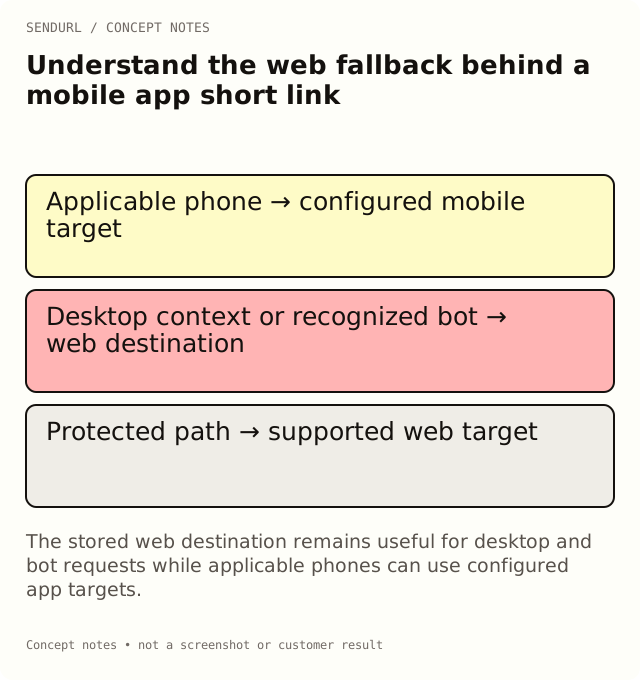
A mobile target is an additional route choice, not a replacement for maintaining the stored web destination. Desktop contexts, recognized bots and some tablet modes still use that web fallback.
A team configures an app target and stops reviewing the web page behind its shared link. The campaign looks right on one phone, but the social card, a desktop reader or a tablet in desktop mode reaches an obsolete web resource. The fallback has become part of the live product experience even though it was treated as an afterthought.
Give the stored destination a real job
The ordinary destination should serve a useful task for readers who do not take the mobile path. For an illustrative product-help route, that might be a public setup page with a clear way to continue on the appropriate device. It should not be a placeholder that assumes every request will become an app open.
SendURL selects its mobile targets from the recognized request context. An iOS context can use the configured iOS target, and an Android context can use the Android target. Recognized bots and desktop contexts use the stored destination. The exact observed request matters more than the name printed on the physical device.
A tablet can behave like a desktop request
A tablet using desktop browsing mode may be treated as desktop by design. That is a reason to maintain a usable web destination, not a reason to guess that the user’s device detection is broken. Test the actual browser mode and record which target was observed.
The same principle applies when a link is opened inside another application’s browser. You need a representative client observation, not an assumption based only on the operating system someone says they use. Keep the distribution context in the test record.
Routing is not installation attribution
Selecting an app target does not establish that the application is installed, that the target screen exists or that the customer completed the intended task. The app and its supported linking behavior determine those later steps.
Do not report a redirect as an installation or an activated user. If the business needs those outcomes, define them in the application and use an appropriate measurement system. A URL shortener’s route selection is earlier-stage evidence with a narrower meaning.
Work through a setup-resource example
Imagine one saved support link with a web setup guide and approved iOS and Android targets. A desktop visitor should still find useful instructions. A recognized preview bot should retrieve the ordinary web destination rather than exercise the app screen. A phone test needs to verify what happens after the target is chosen, not merely that the URL changed.
Write those expected paths before testing. Use synthetic or otherwise approved fixtures and record actual observations separately. An empty test row means untested, not passed by analogy with another device.
Password protection changes the available target path
A password-protected link sends a human visitor only to a web target after the password step; a non-web custom-scheme mobile target is not used there. This condition is easy to miss when unrestricted app links and protected resource links are reviewed by different teams.
Test the protected journey explicitly if the campaign uses it. A working app target in an unprotected browser session does not establish that the password path behaves the same way. Keep document or account authorization at the destination where the actual private task requires it.
A/B tests add another reason to inspect precedence
Applicable mobile targets take priority over a destination split. A team testing two web landing pages may therefore observe a different eligible audience than it expected when mobile targets are configured. Check the route design before interpreting uneven variant totals.
This is not a promise of native deferred deep linking, installation attribution or a unified conversion journey. Do not add those capabilities to a campaign brief unless the actual application integration supplies them. The shared route still needs its ordinary fallback and a tested destination task.
Separate the plan controls
Mobile app targets are available across plans. Changing the stored web destination after creation is Pro+. Password and expiry controls are also Pro+. These are separate features, even though they can affect the same public route.
Compare the current routing and paid features before choosing a workflow. If the team needs a maintained web fallback that can be retargeted after distribution, plan for the destination-edit entitlement rather than assuming a mobile-target control grants it.
Accept the route from each relevant context
Follow the real distributed short address on representative phones, a desktop and any relevant tablet mode. Check recognized-bot behavior with appropriate inspection tools, while noting that automated requests can affect link counts. Record the actual final task result separately from target selection.
Create the link under an owned SendURL account with a named web-fallback owner. The SendURL REST API reference documents the target fields and supported validation. For route measurement itself, see How to Track Link Clicks.
Frequently asked questions
Why does a desktop-mode tablet use the web destination?
The recognized request context can be desktop. The web fallback is therefore an intentional part of the supported journey.
Does opening an app target prove an app install?
No. Route choice and application installation or activation are separate observations.
Will a password-protected link open a custom-scheme app target?
The protected path uses a web target. Test the actual supported combination rather than copying an unrestricted app-link result.
Can mobile targets bypass a landing-page A/B split?
Yes. Applicable mobile targets take precedence, so verify the audience that actually reaches the split.
Start tracking links free.
Create your first short link with click analytics in seconds. No credit card, no sign-up to start.