Why a folder-scoped API key cannot see another folder’s links
A folder-scoped key is intentionally confined to its assigned folder and organization. Check the key’s scope and the requested operation before interpreting an empty result or refusal as a missing-link incident.
A script lists the campaign’s links successfully, then fails when a teammate points it at a second folder. The link exists in the console, so the operator assumes the API lost it. The more useful first question is which principal the script is using and what that key is allowed to access.
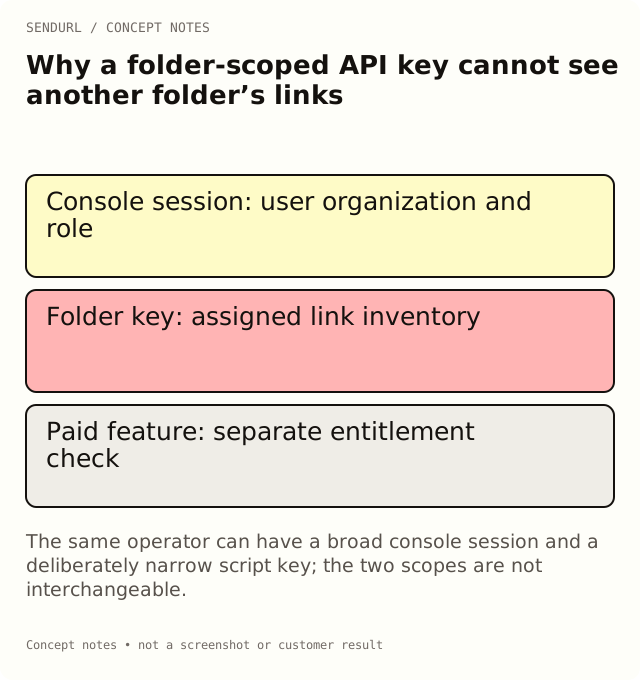
A key is not the same context as the signed-in owner
The console uses a user session with its organization and role. An API request uses the supplied key’s own scope. A person who can view several folders in the console does not automatically give a folder-scoped script access to all of them.
Keep the authorized organization and folder in the integration’s configuration record. Do not copy a broader key into a debugging tool merely because a restricted request was refused. First establish whether the requested operation actually belongs within the integration’s approved responsibility.
Folder scope is a deliberate boundary
A folder-scoped key confines its link queries to that folder. An organization-level key has a different reach within its organization. Neither one is permission to access another organization’s private inventory.
For an illustrative newsletter integration, a key limited to the launch folder may be the correct design. When the same script is later asked to operate on support links elsewhere, the scope decision needs review. A convenient reused script is not by itself a reason to broaden access.
Read the refusal in context
Some API error identifiers retain older project terminology for compatibility even though the product now uses folders. An identifier such as project_forbidden can therefore concern a folder-scope mismatch. Read the documented operation and the account context instead of assuming the word proves you called a separate legacy feature.
An out-of-scope link read can also be hidden rather than revealing another scope’s record. Do not treat every not-found-style response as proof that the link was deleted. Compare the exact link identifier, organization and key scope through the authorized owner’s process.
Distinguish permissions from plan entitlements
A request can be correctly scoped and still ask for a feature unavailable on the organization’s plan. Editing a saved destination is Pro+. A plan-upgrade refusal is a different condition from a key being confined to another folder.
Buying a higher plan does not grant a key access to an unrelated organization or automatically change its folder scope. Compare paid features and limits for the capability question, and review the actual key configuration for the access question. Keep those troubleshooting paths separate.
Distinguish API endpoints from session-only analytics
The public API supports its documented link and click operations. The console’s analytics endpoints have their own session requirements. Do not assume every route observed in a browser network panel is a public API-key endpoint.
When the task is exporting or reading a link’s supported all-time statistics, use the documented API operation and its response definition. Do not replace a console dashboard call with a key and promise identical behavior, history filtering or advanced dimensions. The SendURL REST API reference is the contract for the integration.
A reproducible access review
Start with a controlled link in the intended folder and a key created for that responsibility. Perform the supported read and verify that the response concerns the expected link. Then review a deliberately out-of-scope case only in an authorized test context, recording the documented refusal rather than treating it as a production data-loss event.
Keep keys and authorization headers out of the written incident evidence. A useful reproduction can describe the scope and fixed error identifier without including the secret value. Avoid logging private destinations or account data merely to make the error report more verbose.
Preserve the least confusing ownership model
Use separate integrations when responsibilities genuinely differ, and give each a maintainer who can rotate or revoke its key through the proper process. A temporary employee’s broad personal setup is not a substitute for the intended organization’s ownership.
Folders organize inventory and scope some keys; tags supply overlapping labels. Adding a tag to a link does not move it into a key’s authorized folder or grant access. Keep the business labels separate from the actual permission boundary.
Create the intended SendURL organization before configuring a production integration. URL Shortener API in Python provides supported examples, while Folders and Workspaces explains the organization model. The result should be a correctly scoped operation, not a refusal suppressed by an undocumented credential change.
Frequently asked questions
Why can I see a link in the console but not through this key?
The session and the key can have different scopes. Check the organization, assigned folder and documented operation.
Does upgrading remove a key’s folder restriction?
No. Feature entitlements and access scope are different boundaries.
Why does an error still say project?
Some identifiers retain the former project terminology for compatibility. Interpret it with the documented folder-scope behavior.
Can an API key call every dashboard analytics endpoint?
No. Use documented API-key operations; console analytics endpoints have their own session requirements.
Shorten links from your code.
The REST API is on every plan, Free included: create links and read their clicks with an API key.