Review a link CSV before sharing it outside the team
A link export can contain more context than its short addresses suggest. Review destinations, query values, titles and business ownership before sharing a copy; CSV export is not automatic anonymization.
A partner asks for the campaign’s link list. The exported file looks like a routine spreadsheet, but one destination carries an account-specific token and another title names an unreleased project. The short URL’s neat appearance did not remove that information from the inventory.
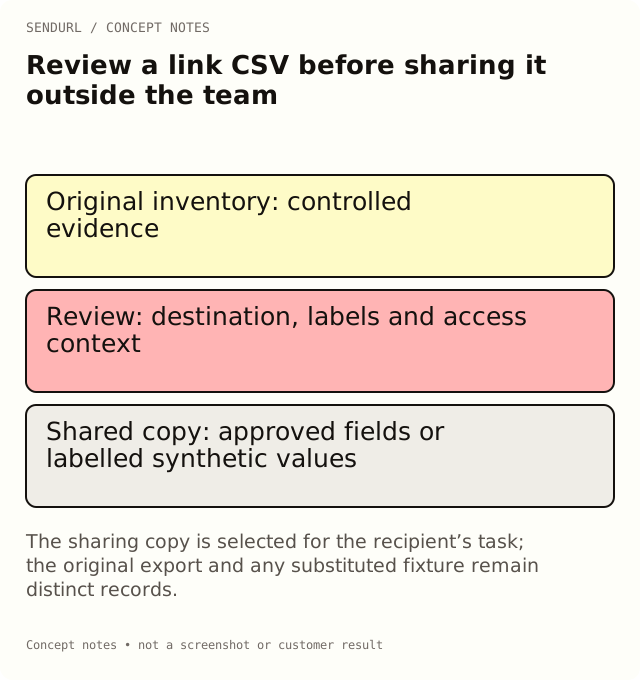
Start with the purpose of the shared copy
Decide what the recipient needs to do. A print supplier may need approved public routes and artwork references. An analyst may need a dated aggregate report. A developer debugging a parser may need a small synthetic fixture. These jobs do not necessarily require the same columns or real customer destinations.
Do not export everything simply because a file is easy to generate. Define the permitted purpose and the people authorized to receive it, then prepare a copy that serves that purpose. Keep the original evidence in the appropriate controlled location rather than editing it destructively.
Inspect destinations, not just short addresses
A destination URL can carry parameters with meaningful or sensitive values. A short route does not make those values disappear from a management export. Review the actual query and path where the shared copy includes them.
For an illustrative example, a general public setup page may be suitable for a supplier’s list, while an order-specific page may require a different access process. Do not substitute a guessed public URL and pretend it was the approved original. Mark the field withheld, provide a synthetic example or obtain the authorized replacement through the destination owner.
Titles and labels can reveal business context
A title can contain a customer name, an internal launch date or a private sales stage. Tags and folder context can also disclose how the organization categorizes material. Review these fields according to the recipient’s actual need, not merely whether they contain a recognizable email address.
Removing one obvious personal column is not proof that the remaining file is anonymous. Meaning can be carried in several fields together. Keep any redaction or replacement rule explicit so the recipient knows which values are real observations and which are illustrative substitutes.
Keep secrets outside the handoff
An API key, a guest claim token or a password does not belong in a broadly shared inventory. Use the organization’s proper access-management process when somebody needs privileged access. Do not paste credentials into a source spreadsheet as a convenience for the next reviewer.
A destination itself can also be a bearer-style access path. Ask the destination owner about the access model instead of assuming that any URL is harmless to distribute. The right handling depends on the actual resource and the authorized recipient, not on its file extension or slug.
Preserve a useful reproduction example
For a CSV parsing issue, a synthetic fixture can preserve the structure without preserving a live private route. Include quoted commas, line breaks or other relevant formatting deliberately, and label the fixture as synthetic. Do not report invented campaign totals as production observations.
Then test the fixture against the receiving process. The useful question is whether it reproduces the formatting or mapping problem. A sample that parses successfully but removes the failing structure may be safe-looking and diagnostically useless.
Review spreadsheet behavior as a separate concern
A CSV is text, and spreadsheet applications can interpret some cell content as formulas or other special values. Inspect the receiving workflow and the actual export treatment rather than assuming that a file extension guarantees safe rendering. Keep a raw original where authorized and review a separate sharing copy.
Do not promise that one escape rule protects every spreadsheet after every later edit. If the handoff only needs a human-readable approval list, choose the format and process that actually support that task. A successful syntax check is not a privacy or distribution approval.
Retain the observation context
Record when the export was made, which inventory or filters it covers and what was removed or substituted. A current destination field is not a historical ledger of every earlier campaign mapping. That distinction matters if the recipient is asked to interpret previous activity.
CSV link export is available across SendURL plans. Advanced analytics and dashboard history are separate features; pricing describes those differences. Do not assume that buying a plan converts a link inventory into consented customer data or an automatically anonymized report.
Create an owned SendURL account for maintained campaign links where that organization and access model fits the work. The SendURL API reference documents supported exports, and Can You See Who Clicked Your Link? explains the boundary between route records and named-reader evidence.
Frequently asked questions
Does a short link hide its destination in a management export?
Do not assume it does. Review the actual exported fields, including the destination and its query values.
Is removing email addresses enough to anonymize the file?
Not necessarily. Titles, paths, labels and combinations of fields can reveal context. Review the purpose and recipient.
Should I overwrite the original export with cleaned values?
Keep authorized evidence appropriately and prepare a separate sharing copy with its transformation described.
Can a synthetic CSV still be a useful bug example?
Yes, when it preserves the relevant structure and is clearly labelled as a fixture rather than a production observation.
Start tracking links free.
Create your first short link with click analytics in seconds. No credit card, no sign-up to start.