How URL Shorteners Work: 301 vs 302, 404 vs 410
A short link is a stored code plus an HTTP redirect. The whole path of a tap, with real responses from snu.to: the slug lookup, the cache, why it's a 302 and not a 301, when the click is written, and what 404 and 410 mean.
A URL shortener stores your long URL under a short code, and when someone opens the short link it looks the code up and answers with an HTTP redirect to the long URL. The browser follows that redirect on its own, so the visitor lands on the destination without seeing the stop in between.
That is the whole trick. The details are where shorteners differ: which redirect code they send, how fast the lookup is, when the click is counted, and what a dead link says. Below is the path of one tap through SendURL, with real responses from snu.to.
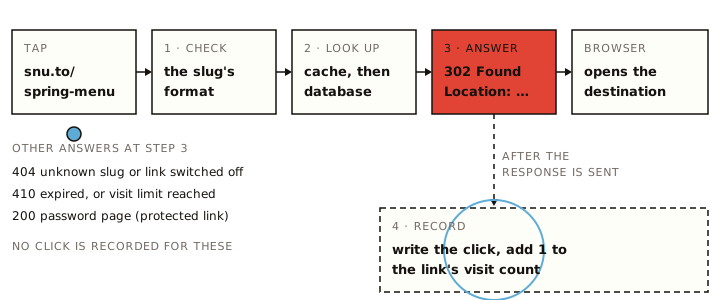
How do URL shorteners work?
There are two moments: making the link, and opening it.
Making the link. You give the shortener a destination such as https://example.com/menus/spring-2026?utm_source=poster&utm_medium=print. It saves that destination under a code, the slug, and hands back snu.to/<slug>. The slug is either one you choose (a custom slug like spring-menu) or one it generates.
Generated slugs come from one of two methods. Some shorteners take the database row number and write it in base 62 (letters and digits), so links get longer as the service grows. Others pick random characters. SendURL does the second: 5 random letters and digits for links made through the API or on the home page, 6 when the console proposes one. Five characters from 62 give 62⁵, about 916 million combinations.
Opening the link. Five steps, all in the time it takes the page to start loading:
- The browser resolves
snu.to, connects over HTTPS and sendsGET /spring-menu. - The shortener checks that the slug could be real. On SendURL anything outside
A-Z a-z 0-9 . _ ~ -(or over 64 characters) gets the "Link not found" page straight away, with no lookup. - It looks the slug up: first in a shared in-memory cache, then in the database if the cache doesn't have it.
- It answers. For a working link that is
302 Foundwith aLocationheader holding the destination. - The browser requests the destination. The shortener is out of the picture.
On SendURL there is a sixth step that the visitor never waits for: after the 302 has gone out, the click is written to the database and the link's visit count goes up by one. More on that below.
What a real redirect looks like
You can watch a redirect with curl. The -I flag asks for headers only, and curl doesn't follow redirects unless you add -L. This is the real response from the root of snu.to, which sends people to our website with the same 302 a short link uses:
curl -sI https://snu.to/HTTP/2 302
location: https://sendurl.to
referrer-policy: no-referrer
strict-transport-security: max-age=31536000; includeSubDomains
server: cloudflareA short link's response looks the same, with its destination in location. Two things are missing on purpose: there's no cache-control header telling browsers to keep the answer, and there's no page body worth reading. The browser acts on location and moves on.
A slug that doesn't exist gets a status code instead of a redirect:
curl -s -o /dev/null -w "%{http_code} %{redirect_url}\n" https://snu.to/no-such-link-2026404The same command on a working link prints 302 and the destination, which makes it a quick way to see where a short link goes before you open it. Without a terminal, the free redirect checker follows every hop and shows each status code; are short links safe? has other ways to check one. On SendURL that check is a real visit: a GET or HEAD that receives the 302 is counted as a click, because SendURL doesn't filter tools or bots.
Anything you add after the slug isn't passed on. snu.to/spring-menu?utm_source=x still redirects to the stored destination, the destination's own query string included, and nothing else. Put UTM parameters in the destination when you make the link. The one exception is ?q, which SendURL's QR codes add so it can mark a scan, and which is dropped before the redirect.
A fragment works differently. snu.to/spring-menu#desserts never sends #desserts to the server, but the browser keeps it and applies it to the destination, because a redirect "inherits the original reference's fragment" when the Location has none (RFC 9110, section 10.2.2).
301 vs 302: which redirect a short link should use
Shorteners that count clicks need every tap to reach them. Many send a temporary redirect (302); some send a 301 with a short cache lifetime instead: Bitly answered a 301 with cache-control: private, max-age=90 when we checked on 15 October 2026. SendURL sends a 302 with no cache header. It comes down to caching.
The HTTP standard says "a 301 response is heuristically cacheable" (RFC 9110, section 15.4.2): unless the server says otherwise, a browser may store it and skip the request next time. A 302 carries no such default; the standard says the client "ought to continue to use the target URI for future requests" (section 15.4.3). So with a 302, every tap reaches the shortener.
| 301 Moved Permanently | 302 Found | |
|---|---|---|
| Meaning (RFC 9110) | The resource has a new permanent URI | The resource is temporarily somewhere else |
| Browser may cache it | Yes, by default | Only if the response says so |
| Second tap from the same browser | May go straight to the destination | Goes through the shortener again |
| Clicks the shortener can count | Can undercount repeat visits, unless the response limits caching | Every visit that reaches it |
| Change the destination later | Browsers that cached the old answer may keep using it | Takes effect on the next tap |
| Google Search (docs) | Treated as a signal that the target should be canonical | Not used as that signal |
307 and 308 are the strict versions of 302 and 301: they forbid the browser from changing a POST into a GET. For a link someone taps, which is always a GET, they behave like 302 and 301.
SendURL answers every working link with a 302. That is what lets it count a person's second and third visit, and what makes a destination change reach people who already opened the link.
Do short links hurt SEO?
Not in any way Google documents. Its redirect guidance is about which URL it indexes and shows in results, and for a link in an email, a chat, a social post or on a poster, the visitor ends up on your page either way.
Where it matters is on your own website. Google says that with a temporary redirect "the indexing pipeline doesn't use the redirect as a signal that the redirect target should be canonical" (Redirects and Google Search, updated 14 April 2026). So link from your own pages to your own pages directly, and keep short links for places where a long URL is a problem.
404 vs 410: what a dead short link says
A short link that no longer redirects should say why, and the status code is how it tells browsers and crawlers. The standard's 410 Gone means the resource is "intentionally unavailable" and "likely to be permanent"; if the server can't know that, it "ought to" send 404 (RFC 9110, section 15.5.11).
Here is what SendURL answers in each case:
| Situation | Status | Page the visitor sees | Click recorded |
|---|---|---|---|
| Working link | 302 | The destination | Yes |
| Slug never existed | 404 | "Link not found" | No |
| Link switched off by its owner | 404 | "Link not found" | No |
| Link deleted through the API | 404 | "Link not found" (the slug is free for anyone to take) | No |
| Expiry date passed | 410 | "Link expired" | No |
| Visit limit reached | 410 | "Visit limit reached" | No |
| Password-protected | 200 | A password form; the right password gets the 302 | Only after the right password |
A disabled link is a 404 because it can come back: switch it on again and it redirects as before. An expired link is a 410 because, for a limited-time offer, gone is the accurate answer. SendURL still lets you extend or remove the expiry afterwards, which revives the link.
When the click is recorded
A shortener can count a click before it redirects, or after. Counting first makes every visitor wait for a database write. SendURL redirects first and records the click straight after the response is sent, so the analytics never slow the tap down.
The record holds the time, the country (from the IP address, via Cloudflare), device, browser, operating system, referrer when the browser sends one, IP address, user agent, and whether it came through the link's QR code. The full list, with what each field can and can't tell you, is in what SendURL records per click.
What it doesn't record matters as much:
- No city. Location stops at the country.
- No identity. A click is a device and a network, not a named person.
- No bot filtering and no unique-click count. Link previews that follow the redirect (Slack's unfurler, for example), email security scanners and
curlchecks that get the 302 are all counted, and so is the same person tapping twice. - Nothing after the landing. What the visitor does on the destination page is up to that site's analytics.
The link analytics page shows how those records add up into charts.
Why the cache matters
Most short links are opened many times, often in bursts after a post goes out. Reading the database on every tap would work, but a cache in memory answers faster and takes the load off the database. SendURL keeps a looked-up link in a shared cache for a few minutes, so a burst of taps on snu.to/spring-menu needs one database read for the lookup (each click is still written, after its redirect).
The catch with any cache is staleness. When you edit, disable or delete a link, SendURL clears its cache entry straight away (and again two seconds later, to catch a tap that was in flight), so changes take effect within seconds. Two checks never trust the cache: the expiry is compared with the clock on every tap, and a password is always checked against the database.
What happens when a shortener shuts down
Every short link depends on its shortener staying online. When Google retired goo.gl, links that showed no activity in late 2024 stopped working after 25 August 2025, while actively used links were kept (Google, 1 August 2025). Printed codes and old documents pointing at those links now lead nowhere.
The full timeline, and what to look for in a shortener so your links don't get stranded, is in goo.gl alternatives. The short version: prefer a service where you can change destinations, switch links off rather than delete them, and pull a list of all your links through an API.
Checklist: before you share a short link
- The destination is the final URL, with its UTM parameters already in it.
curl -s -o /dev/null -w "%{http_code} %{redirect_url}\n" <short link>prints302and the right destination (on SendURL this counts as one click).- On your own website, you link to your pages directly, not through a short link.
- If the link is for a limited offer, it has an expiry date, so late visitors get a clear "expired" page instead of a stale offer.
- If it goes on paper, you know how you'd change its destination later.
- You keep your own record of what each short link points to.
To see the redirect and the click record for yourself, shorten a link on the home page; no account needed.
Frequently asked questions
What is a short link?
A short URL on a shortener's domain, such as snu.to/spring-menu, that redirects to a longer address. The shortener stores the pair (code and destination) and answers every visit with a redirect to the destination.
How long do short links last?
As long as the shortener keeps serving them and the owner doesn't switch them off. On SendURL a link works until you disable it, it expires (if you set an expiry), or it reaches its visit limit (100,000 visits per link on Free). If a shortener closes, its links stop working, which is what happened to inactive goo.gl links in August 2025.
Can you change where a short link goes?
On most shorteners, yes, because the destination is just a stored value. On SendURL you change it with one API call (PATCH /links/:id); the slug, QR code and click history stay the same.
Does checking a short link with curl count as a click?
On SendURL, yes. A GET or HEAD request that gets the 302 is recorded like any other visit, because SendURL doesn't filter bots or tools. Other shorteners may filter some automated requests.
Start tracking links free.
Create your first short link with click analytics in seconds. No credit card, no sign-up to start.
Shorten a link